Disabling auto-forms/shapes possible? | Community
Skip to main content
Newcomer
March 10, 2025
Solved

Disabling auto-forms/shapes possible?

  • March 10, 2025
  • 2 replies
  • 6 views

When I use the whiteboard to train japanese hiragana characters, I can't paint slow. When I stay on the left mouse button for too long, my painted character is transformed into a shape, e.g. a square or a circle. I already disabled all shapes and I am under the impression that the normal pencil shouldn't do autoforms, as there is a separate tool "intelligent drawing".


How/where do I disable this behaviour or is there a better tool to draw letters?

Best answer by AlexMa581

Hi @deep470 ,

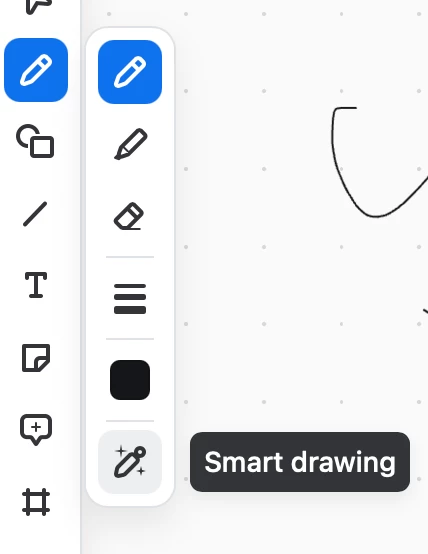
Have you tried turning off the Smart Drawing feature? When this feature is enabled, it can cause your pen drawings to transform into shapes after you release the pen or mouse button. Disabling it should prevent this behavior.


Let me know if this helps or if you need further assistance!

@deep470

2 replies

AlexMa581
Employee
AlexMa581Answer
Employee
April 15, 2025

Hi @deep470 ,

Have you tried turning off the Smart Drawing feature? When this feature is enabled, it can cause your pen drawings to transform into shapes after you release the pen or mouse button. Disabling it should prevent this behavior.


Let me know if this helps or if you need further assistance!

@deep470

deep470Author
Newcomer
April 15, 2025

Thanks, it wasn't enabled but I toggled smart draw a few times and now it stays off. Maybe it was enabled and there was a display error. Thank you for your reply!