

Zoom Webinar Title | Community
Skip to main content
Newcomer
June 16, 2025
Solved

Zoom Webinar Title

  • June 16, 2025
  • 2 replies
  • 2 views

We've had a webinar set up for months now with a particular title and just recently the title of the Zoom webinar changed to 'Zoom Webinar'. Apparently, admin can change this but neither the owner nor admin can change this. Does anyone have any answers?

    Best answer by Ray_Harwood

    Welcome to the Zoom Community, @Bek_C.


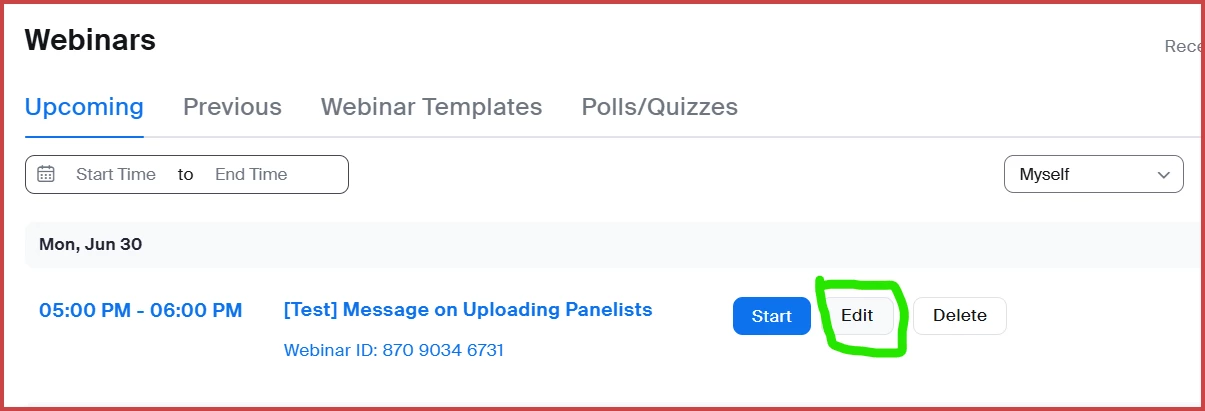
    The owner of the webinar can indeed change the name/title of the webinar.  Go to your webinar listing on the Zoom web portal (https://zoom.us/webinar/list/#/upcoming) and hover over the existing title to see the Start and Edit buttons; click Edit:

    When you do, you'll get the editable text box for the title:

    Edit as desired, and then scroll down to click Save.

    2 replies

    Ray_Harwood
    Community Super Champion | Customer
    Community Super Champion | Customer
    June 23, 2025

    Welcome to the Zoom Community, @Bek_C.


    The owner of the webinar can indeed change the name/title of the webinar.  Go to your webinar listing on the Zoom web portal (https://zoom.us/webinar/list/#/upcoming) and hover over the existing title to see the Start and Edit buttons; click Edit:

    When you do, you'll get the editable text box for the title:

    Edit as desired, and then scroll down to click Save.

    MGSR
    Community Manager
    Community Manager
    July 8, 2025

    Hi @Bek_C! I wanted to let you know that I’ve marked @Ray_Harwood's response as the accepted solution, as I believe it answers your question. If you have any more questions or need further clarification, feel free to ask.