Explorer
Apr 5, 2024 2:41 PM UTC
Solved

Zoom and Eventbrite Integration Issues

One of my clients is having a problem connecting his Zoom account to Eventbrite.
We keep getting an error message saying "We are having trouble connecting, please try again".

Anyone else come across this issue? Maybe this is a tech glitch with Eventbrite or Zoom but it's been going on since yesterday, so not sure what's going on.
Ray_Harwood
Community Super Champion | Customer
Apr 6, 2024 7:25 PM UTC

Welcome to the Zoom Community, @chatmarketing.


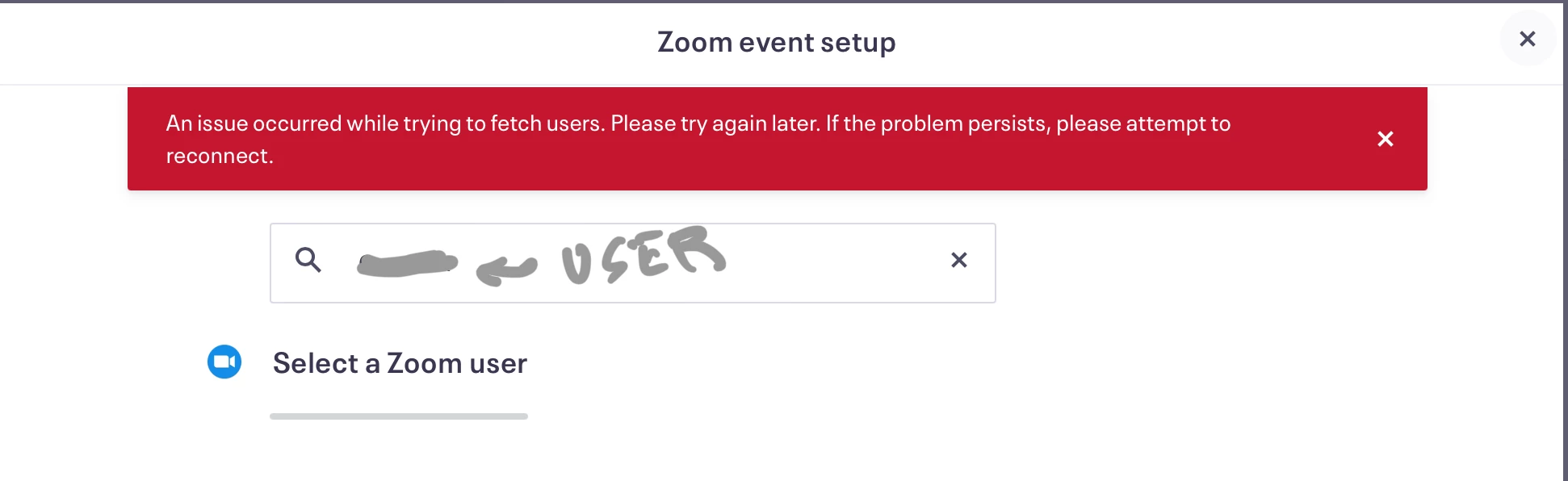
I’ve used Eventbrite a good bit, but not recently.  I just set up a test event, and when I tried to make the Zoom meeting selection, I got this:

I know Zoom is making some network changes in the last couple of days – I’ve been seeing the system maintenance messages. Perhaps that’s the issue, and once the changes are made, it might settle down and work. Maybe. 😎


See the DigiCert notices here: https://status.zoom.us 

15 replies

Ray_Harwood
Community Super Champion | Customer
Apr 6, 2024 7:25 PM UTC

Welcome to the Zoom Community, @chatmarketing.


I’ve used Eventbrite a good bit, but not recently.  I just set up a test event, and when I tried to make the Zoom meeting selection, I got this:

I know Zoom is making some network changes in the last couple of days – I’ve been seeing the system maintenance messages. Perhaps that’s the issue, and once the changes are made, it might settle down and work. Maybe. 😎


See the DigiCert notices here: https://status.zoom.us 

Translate
Newcomer
Oct 12, 2024 5:56 AM UTC

I am having same problem. RED line says error and I can not connect my account to zoom PLEASE assist ~ thank you

Translate
Explorer
Apr 7, 2024 1:06 PM UTC

Thanks Ray, that's much appreciated!

Translate
Explorer
Jul 12, 2024 10:10 AM UTC

Did this get sorted as the below reply does not answer the question? If you did, can you provide insight please as the problem persists and EventBrite pass me to Zoom and Zoom pass me to the Community. Thanks

Translate
Ray_Harwood
Community Super Champion | Customer
Jul 12, 2024 3:14 PM UTC

Welcome to the Zoom Community, @treesjeverlinde.


Earlier this week I set up a webinar for September, and Eventbrite linked right up to it with no trouble. So I think this issue from April 2024 was a temporary glitch. 

Translate
Newcomer
Aug 5, 2024 12:57 AM UTC

i am still having this issue! any other suggestions?

Translate
Newcomer
Aug 12, 2024 1:42 PM UTC

I'm having the same issue for 2 weeks now.  I already tried Chrome and Safari, canceled the cache, disconnected and re-connected both accounts (Zoom and Eventbrite) but still not working. Any suggestions?

Translate
MGSR
Community Manager
Community Manager
Aug 22, 2024 8:08 PM UTC

Have you tried removing your event first? If your event already has Zoom added, delete it before re-adding Zoom. This ensures that Eventbrite doesn't attempt to use the expired token again.

  1. Go to Events and select your event.

  2. Go to Online event page.

  3. Select the pencil icon to edit your Zoom meeting.

  4. Select Delete meeting and confirm.

Please let us know if you need further assistance.

Translate
Newcomer
Dec 18, 2024 6:28 PM UTC

There is no pencil icon anywhere in my Online Event page on Eventbrite. Can you provide a screenshot please? This issue has persisted for weeks for me when I've previously hosted events seamlessly with Eventbrite. 

Translate
Explorer
Aug 21, 2025 9:59 AM UTC

I am experiencing the same problems linking my Zoom account to Eventbrite.  I have raised the issue with Eventbrite but they have suggested I also raise with Zoom. Can anyone offer any advice?


Translate
Ray_Harwood
Community Super Champion | Customer
Aug 21, 2025 3:01 PM UTC

Welcome to the Zoom Community, @ArleneS.


This thread has covered a number of situations. If you’ve tried all of the recommended steps and it’s still not working, it would be helpful if you’d describe exactly what you’re seeing, or better yet, drop in a screen shot if possible. 

Translate