

What should I do if the Breakout Room option is not displayed | Community
Skip to main content
Newcomer
April 22, 2026
Solved

What should I do if the Breakout Room option is not displayed

  • April 22, 2026
  • 2 replies
  • 61 views

Sign in to the Zoom web portal as an administrator with the privilege to edit account settings. In the navigation menu, click Account Management, then click Account Settings. Click the Webinar tab. Under the In Webinar section, click the Breakout Room toggle to enable or disable it.

What should I do if the Breakout Room option is not displayed? Are there specific settings that need to be changed?

(Note: I am currently subscribed to Zoom Workplace Pro and Zoom Webinars | 300 Attendees.)
    Best answer by ExpertswhoJohn

    hi ​@Shinnosuke Tokumoto 

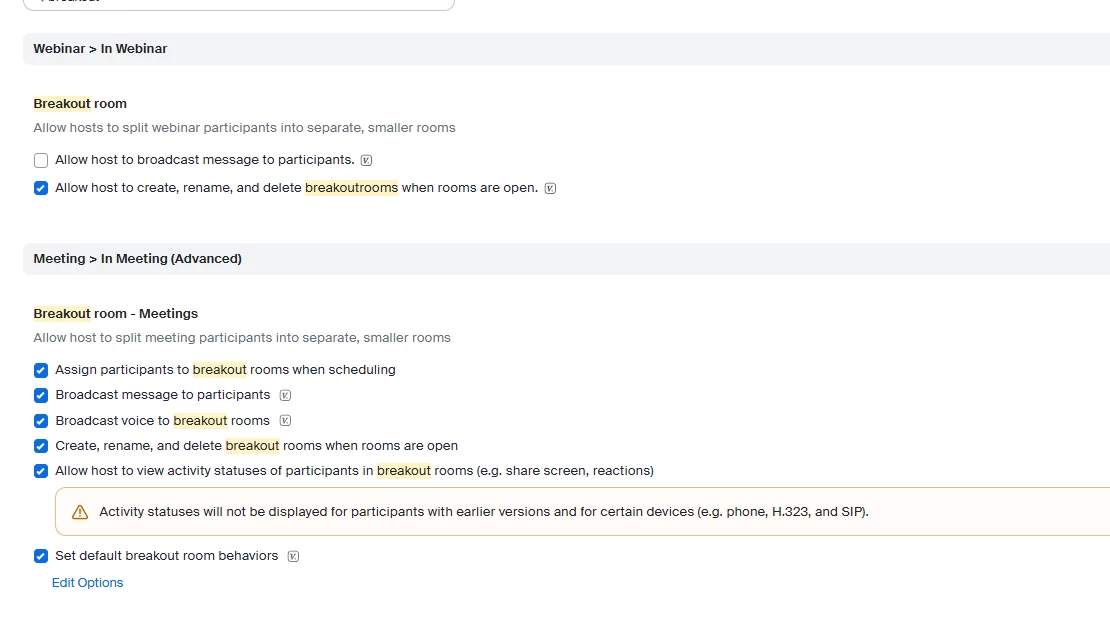
    Breakout Rooms can be enabled or disabled in the account management settings, for those that have access.

    There are settings for meetings and webinars.
     

    All the best


    John

    2 replies

    ExpertswhoJohn
    Community Super Champion | Customer
    Community Super Champion | Customer
    April 22, 2026

    hi ​@Shinnosuke Tokumoto 

    Breakout Rooms can be enabled or disabled in the account management settings, for those that have access.

    There are settings for meetings and webinars.
     

    All the best


    John

    MGSR
    Community Manager
    Community Manager
    May 1, 2026

    Hi ​@Shinnosuke Tokumoto! It’s been a while since we last heard from you, so I’ve gone ahead and marked ​@ExpertswhoJohn’s response as the best answer, as it appears to address your question.

    If you still need help or have any follow-up questions, feel free to reply anytime; we’re here to help!