
Webinar Tool Bar | Community
Skip to main content
Italiangen2022
Explorer
Explorer
January 7, 2022
Solved

Webinar Tool Bar

  • January 7, 2022
  • 2 replies
  • 2 views

Hi.  I noticed that my webinar tool bar is missing two Icons after the video camera.  The Security and the other I can't remember.  Is this normal due to an update or change?  Is there an admin setting for this?  I'm the account holder.


Hope someone can help as I have a webinar tomorrow.


Thank for your assistance.

Peter



    Best answer by GreggG_aka_4G

    Hello Peter-


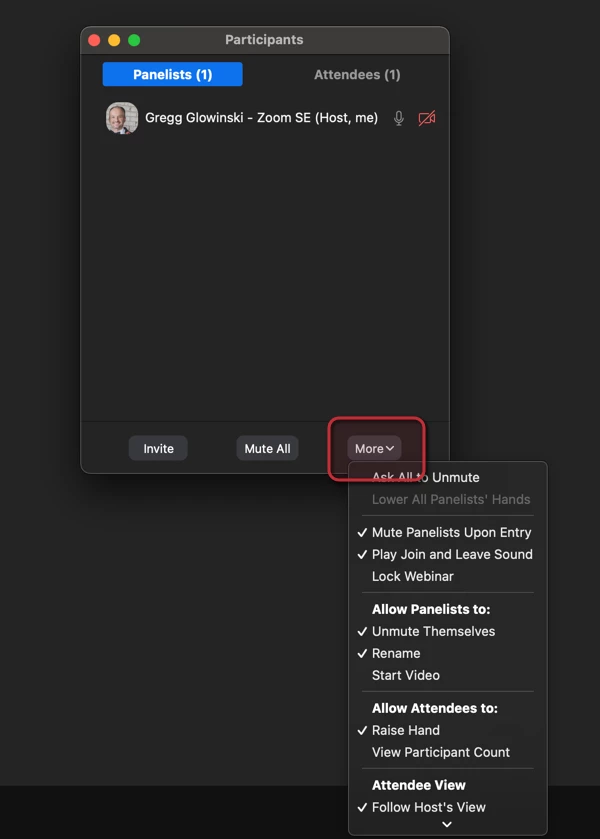
    I believe some of the controls you're looking for will come into play when you have more than 1 participant in the webinar. When more than 1 besides you, you will have the granular controls you're looking for under the participants section under the more section. I'm sending you this URL for additional information on the controls during a webinar. https://support.zoom.us/hc/en-us/articles/115004834466-Managing-attendees-panelists-in-webinar 


    2 replies

    GreggG_aka_4G
    Community Champion | Employee
    Community Champion | Employee
    January 7, 2022

    Hello Peter-


    I believe some of the controls you're looking for will come into play when you have more than 1 participant in the webinar. When more than 1 besides you, you will have the granular controls you're looking for under the participants section under the more section. I'm sending you this URL for additional information on the controls during a webinar. https://support.zoom.us/hc/en-us/articles/115004834466-Managing-attendees-panelists-in-webinar 


    Italiangen2022
    Explorer
    Explorer
    January 8, 2022

    Thanks 4G.  The test I as running at that time was with only 2 panelist and 1 attendee.  I'll verify this tomorrow. 

    Stay Safe, 

    Peter

    GreggG_aka_4G
    Community Champion | Employee
    Community Champion | Employee
    January 19, 2022

    Peter - Just following up to ensure that your testing was successful.


    Cheers.

    Ray_Harwood
    Community Super Champion | Customer
    Community Super Champion | Customer
    January 26, 2023

    I'm having the same issue - no Security icon in any of my Webinars.  Meetings have a Security icon, not in Webinars.


    Gregg... the word Security doesn't appear in the article you listed.  But this one certainly has it in a section referring to Webinars:

    https://support.zoom.us/hc/en-us/articles/360041848151-In-meeting-security-options


    Perhaps all of the important functions are dispersed elsewhere?  I'm thinking a deinstall/reinstall might be in my future... except this is happening on THREE machines, two of them on 5.13.5 and one on 5.12.9.  So there must be some setting somewhere that says "don't show the Security icon" in my settings, yes?