

Using Webinar Polls but only wanting to see the poll for that webinar | Community
Skip to main content
Newcomer
January 9, 2024
Solved

Using Webinar Polls but only wanting to see the poll for that webinar

  • January 9, 2024
  • 3 replies
  • 0 views

Whenever we create a "Poll" on our Zoom account we find that any existing polls for other webinars will also appear as an option to be used in the new scheduled webinar.  Is there any way to prevent this from happening?
    Best answer by YaBoiB

    Hello @TALKZoom


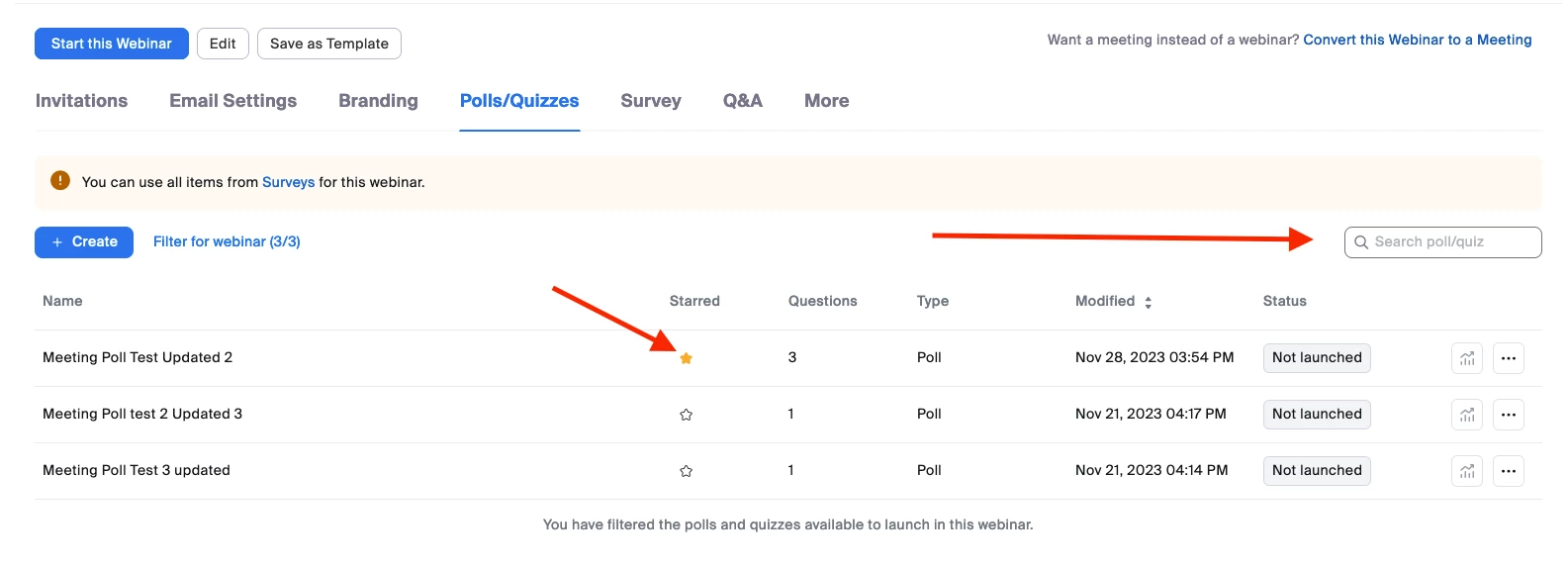
     All of your polls are now in a Poll library, which makes them all available to you. After you schedule your webinar you can go into the Polls/Quizzes section and star the polls that you would like to use for your webinar/meetings. You can also search for your polls in the section marked with an arrow for the polls in your library. 


    3 replies

    YaBoiB
    Community Champion | Employee
    YaBoiBAnswer
    Community Champion | Employee
    January 9, 2024

    Hello @TALKZoom


     All of your polls are now in a Poll library, which makes them all available to you. After you schedule your webinar you can go into the Polls/Quizzes section and star the polls that you would like to use for your webinar/meetings. You can also search for your polls in the section marked with an arrow for the polls in your library. 


    Newcomer
    January 16, 2024

    @YaBoiB is there a way to turn off the poll library? We are creating several unique polls for each of our webinars, and having to wade through potentially 50+ to turn them off will become really cumbersome. 

    Thank you! 

    YaBoiB
    Community Champion | Employee
    Community Champion | Employee
    January 16, 2024

    Hello @Rojask , 


     To my knowledge, there is no way to disable the poll library on your account. The best advice I can provide you is to "star" the unique polls for each of your webinars to make them easier to distinguish. 

    Newcomer
    November 11, 2024

    I'm sorry but this is the worst "improved" feature Zoom have brought out. We used to be able to create a webinar template with a quiz  and that's all we would see each time we use that template. Now we use the templates and end up having to troll through several polls until we find the one we want if people forget to "star" the relevant one.  Why can't you save a quiz to a template to avoid all of this like you used to be able to?