

Trying to play music in webinar during session and not working | Community
Skip to main content
Newcomer
April 2, 2025
Solved

Trying to play music in webinar during session and not working

  • April 2, 2025
  • 3 replies
  • 2 views

I have tried everything and for some reason can't get the music to play during our "breaks."

The instructions say to click on my photo and then settings then "audio" there is no "audio" settings on my settings.
    Best answer by ExpertswhoJohn

    hi @DanaWilliams 
    welcome to the community.
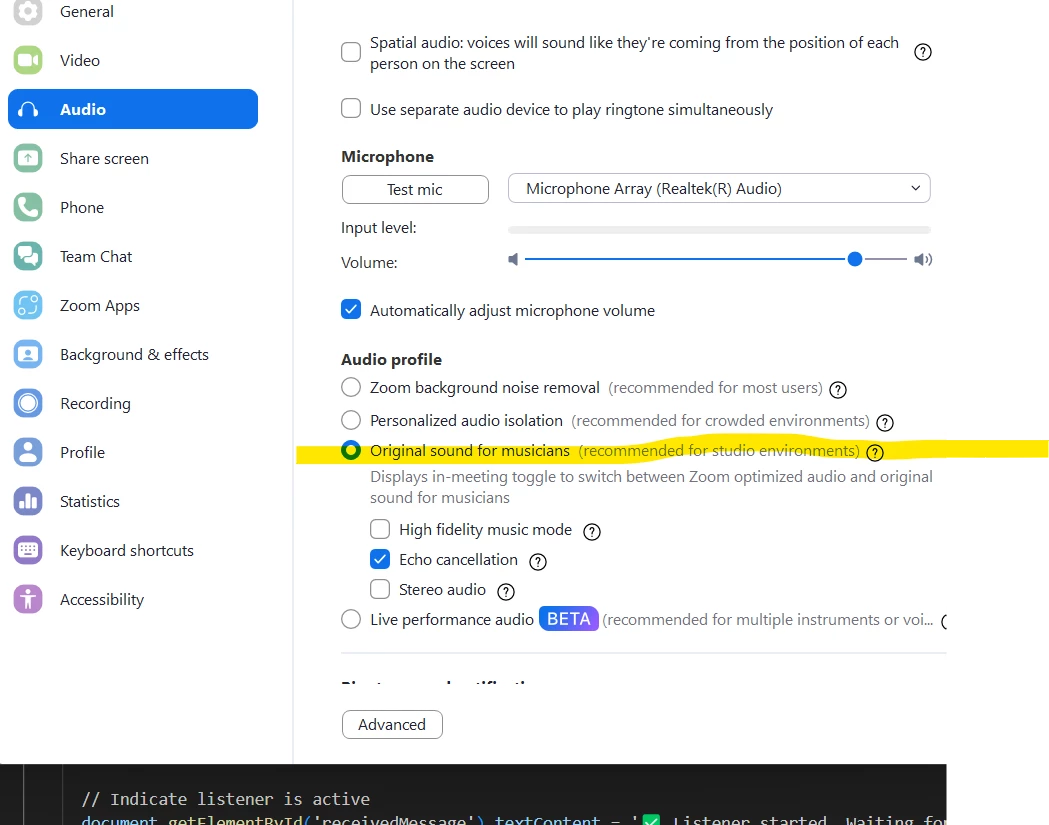
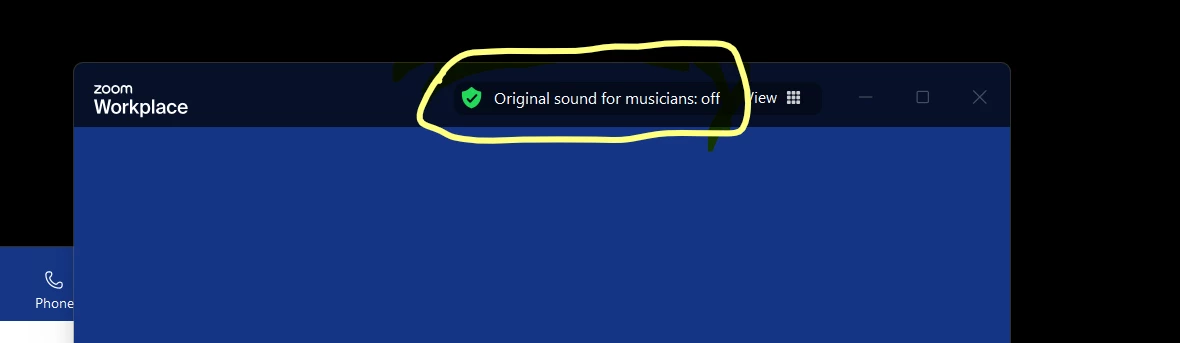
    When you are playing music during breaks you need to set your audio as original sounds, otherwise zoom will treat your music as background noise and remove it.
    Set it in your settings 

    and then activate it when you need it at the top of your zooom window.


    all the best


    John


    3 replies

    ExpertswhoJohn
    Community Super Champion | Customer
    Community Super Champion | Customer
    April 17, 2025

    hi @DanaWilliams 
    welcome to the community.
    When you are playing music during breaks you need to set your audio as original sounds, otherwise zoom will treat your music as background noise and remove it.
    Set it in your settings 

    and then activate it when you need it at the top of your zooom window.


    all the best


    John


    Newcomer
    June 11, 2025

    and if that doesn't work, what next?

    ExpertswhoJohn
    Community Super Champion | Customer
    Community Super Champion | Customer
    June 12, 2025

    Zoom will take the music from your default device, so work out what that is and then see if your music player is using the same.
    Sometimes I am listening on my headphones in the meeting, but music will play through the speakers.

    In this case nobody will hear it in zoom, except overhearing on my microphone
    all the best

    John

    Newcomer
    June 13, 2025

    I don't use headphones. I can hear my own music and others can hear when I play music (share audio) . I can't hear the music they play, although I was able to hear an acapella piece. I hear about 1/10 of a second of others' music, then nothing.

    Newcomer
    June 14, 2025

    I found the solution from my wonderful music teacher, Richard Tice. 

    Beside the windows logo, type "installed apps" in the search bubble
    - a whole list of apps shows up
    type into search: Realtek Audio Consul
    click on OPEN
    click on "speakers"
    Under the title SOUND EFFECTS find:
    "Speakers Noise cancellation"
    Turn it OFF