


Simulive webinars | Community
Skip to main content
tuscany123
Newcomer
Newcomer
October 14, 2023
Solved

Simulive webinars

  • October 14, 2023
  • 1 reply
  • 1 view

I purchased a Sessions license in order to produce simulive webinars. When I viewed the training video it said to log in to my Zoom Events hub, select the drop-down arrow and select "across hubs".


I've attached a screenshot. My Events portal is just a blank screen basically, and I don't have a drop-down arrow option.


I also attached my billing plan, showing Sessions active.  


Please advise, thank you
    Best answer by Ohkawa

    @tuscany123 


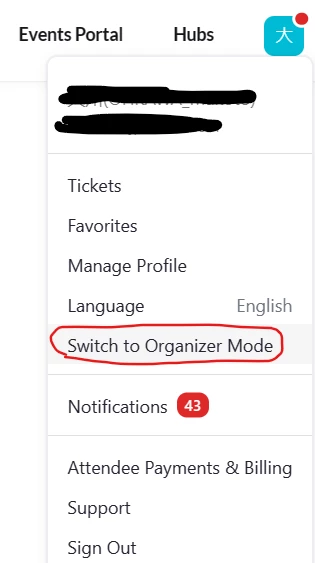
    Click on the icon in the upper right corner and click on "Switch to Organized Mode.
    If you have a license, you will be taken to a menu where you can create and edit Events

    The Events license must be granted to your personal account.
    If you do not see it, it is possible that your personal account has not been granted an Events license.

    1 reply

    Ohkawa
    Community Champion | Customer
    OhkawaAnswer
    Community Champion | Customer
    October 14, 2023

    @tuscany123 


    Click on the icon in the upper right corner and click on "Switch to Organized Mode.
    If you have a license, you will be taken to a menu where you can create and edit Events

    The Events license must be granted to your personal account.
    If you do not see it, it is possible that your personal account has not been granted an Events license.