

Recording webinar - Video overlays presentation | Community
Skip to main content
Newcomer
August 3, 2021
Question

Recording webinar - Video overlays presentation

  • August 3, 2021
  • 2 replies
  • 0 views

All,


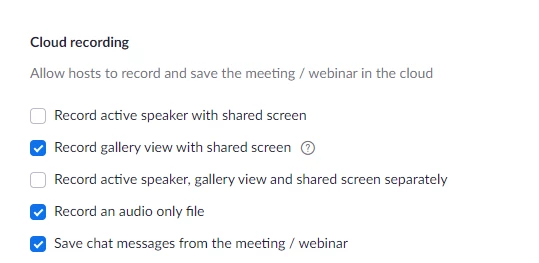
Would be amazing if you could help me with the following question. I want to have recording of my webinar but when I do a test recording the video is ON my presentation instead of next to my presentation. I tried already the gallery view and in my recoding settings all below options but nothing seems to help.


    2 replies

    vescamilla
    Community Champion | Employee
    Community Champion | Employee
    August 3, 2021

    Hi Jozi,


    Thank you for your question. If you choose "Record active speaker, gallery view, and shared screen separately", this will make it so that the video is separate and to the right of the screen share. Below the video will be chat messages if any were sent. For an example of how this recording layout will look, please see one of our recorded training sessions here.


    Hope this helps!

    Newcomer
    February 10, 2022

    I have the same problem.  Does this solution give you separate recorded files on your computer for gallery and shared screen?  I do not want to have more than one MP4 file per recording. Is there a better more current  solution?  Your website says it is recorded on the top right but that has not been my experience.  Sounds like a bug to me.


    JoziAuthor
    Newcomer
    August 3, 2021

    Thanks for your help!!

    Before it was possible to get a recording like below, really simple I know: 


    But I am struggling to get this view


    thanks

    Joanne 


    The_WebiNerd
    Newcomer
    Newcomer
    August 11, 2021

    Maybe try local recording. There is a setting for this that does not appear to exist for cloud recording.  Attaching a screen shot.