

Recording Locally in Webinar Breakout Room | Community
Skip to main content
Newcomer
April 15, 2026
Question

Recording Locally in Webinar Breakout Room

  • April 15, 2026
  • 1 reply
  • 47 views

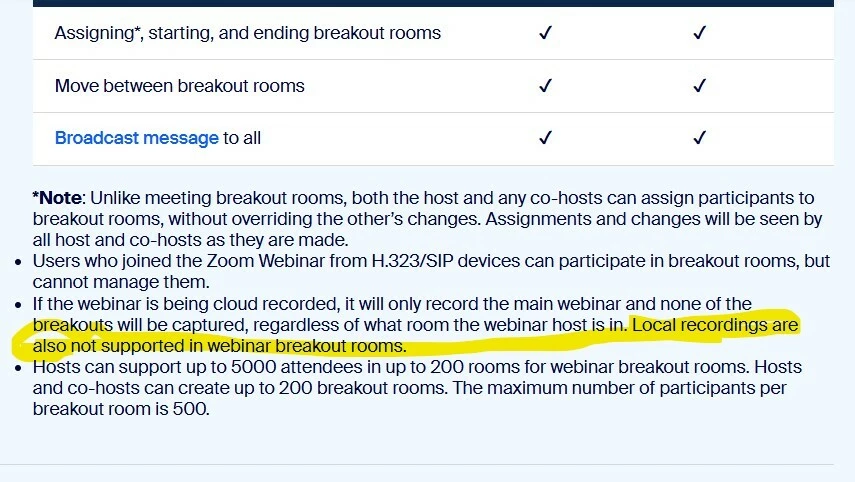
I have a webinar scheduled with breakout rooms enabled. I would like someone in each breakout room to record locally (I will make the co-hosts), just like you do in a Zoom Meeting. Is this possible? I tested and it let me as the Host, but I hesitate because of the confusion is here on the Zoom page: https://support.zoom.com/hc/en/article?id=zm_kb&sysparm_article=KB0057838

Local recordings are also not supported in webinar breakout rooms.


    1 reply

    ArvinG
    Employee
    Employee
    April 16, 2026

    Hi there! Thanks for bringing this up. I can see how that would be confusing, especially since your test as the host seemed to allow a local recording in a webinar breakout room.
     

    To clarify, local recordings are not supported in webinar breakout rooms. What you experienced as the host may appear to work temporarily, but it's not an officially supported behavior and may not function consistently. Co-hosts and panelists will not be able to record locally in their breakout rooms. Also, if you use cloud recording, it will only capture the main webinar session and not any of the breakout discussions.
     

    If you need participants or co-hosts to record locally within breakout rooms, I recommend using a Zoom Meeting instead of a Webinar. Meetings fully support breakout rooms with local recording permissions for hosts and co-hosts.

    Hope this helps clear things up!