

Recording issues | Community
Skip to main content
Newcomer
March 6, 2025
Solved

Recording issues

  • March 6, 2025
  • 1 reply
  • 3 views

When I am recording my webinars you can see gray boxes in the recording and on the screen that viewers are watching. How can make my recordings cleaner. I use two computers.  One to administrate and the other one for recording? Suggestions please! Thank YOU!
    Best answer by anissat

    Here's a quick list of things to know when sharing your screen:

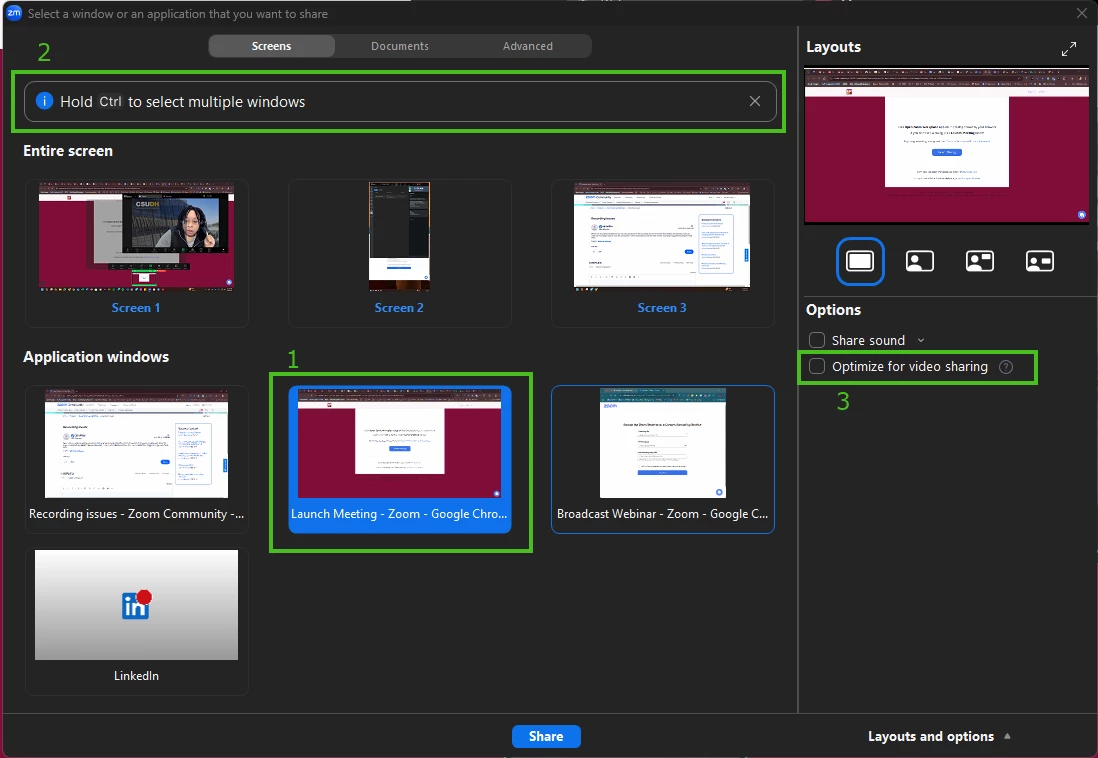
    1. Only share the window or app that you want your audience/attendees to see, as opposed to the entire screen. (💡If you have a PPT presentation, start the presentation first before going to share, and then select the Presentation View, not the PPT file.) 
    2. If you need to share more than one app/window/screen, you can use the Ctrl (PC) or Cmd (Mac) keys to select several items to share.
    3. If you're not playing any video content in your presentation, DO NOT click the "Optimize for Video Sharing"  option. (💡 If you are ONLY sharing a local video file, go to the top of the screen and click Advanced > Video file.)

    1 reply

    anissat
    Community Champion | Customer
    anissatAnswer
    Community Champion | Customer
    March 8, 2025

    Here's a quick list of things to know when sharing your screen:

    1. Only share the window or app that you want your audience/attendees to see, as opposed to the entire screen. (💡If you have a PPT presentation, start the presentation first before going to share, and then select the Presentation View, not the PPT file.) 
    2. If you need to share more than one app/window/screen, you can use the Ctrl (PC) or Cmd (Mac) keys to select several items to share.
    3. If you're not playing any video content in your presentation, DO NOT click the "Optimize for Video Sharing"  option. (💡 If you are ONLY sharing a local video file, go to the top of the screen and click Advanced > Video file.)