

Poor Attendee Webinar Quality on Mac | Community
Skip to main content
Newcomer
October 20, 2023
Solved

Poor Attendee Webinar Quality on Mac

  • October 20, 2023
  • 1 reply
  • 2 views

I was recently experimenting with the 1080P setting checkbox while creating a new webinar.  The quality upgrade for attendees was drastic.  But I only seemed to get better quality when viewing on a PC.  When I was viewing the same webinar on my Mac I was only receiving 640 X 360 resolution video.  If I promoted that Mac up to a panelist, the video quality jumped to 1080.  I was on the same internet connection for both the PC and the Mac, so it wasn't a bandwidth issue.  Has anyone else seen the poor quality only while watching on a Mac?
    Best answer by bstrelko

    Got it - hopefully support can get to the bottom of this.


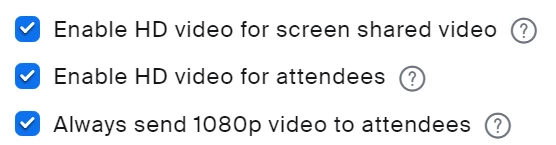
    Just to confirm, you have all 3 of these options checked on your webinar, yeah?

    Also, the Mac and PC are both using the same internet connection and are both viewing Zoom in full-screen with the same view selected?

    1 reply

    bstrelko
    Community Champion | Customer
    Community Champion | Customer
    October 22, 2023

    We have hundreds of Mac users that are able to receive 1920x1080 webinar feeds when this option is checked. Sounds like a bug - please attempt to replicate and then report directly to Zoom Support if the issue persists!


    Can you please also confirm which version of Zoom Client the Mac in question is running?

    adimauroAuthor
    Newcomer
    October 23, 2023

    Each computer is running the latest 5.16.2 version of Zoom.  Attached are screen shots of the stats window from each computer.  I also contacted Support directly from the webinar.

    bstrelko
    Community Champion | Customer
    bstrelkoAnswer
    Community Champion | Customer
    October 23, 2023

    Got it - hopefully support can get to the bottom of this.


    Just to confirm, you have all 3 of these options checked on your webinar, yeah?

    Also, the Mac and PC are both using the same internet connection and are both viewing Zoom in full-screen with the same view selected?