Free and paid access for same event? | Community
Skip to main content
Newcomer
April 24, 2024
Solved

Free and paid access for same event?

  • April 24, 2024
  • 2 replies
  • 4 views

We are hosting an event for the general public that is paid.  However, there is one group of people who we want to provide free access to the event and the recordings of it for the next year as a part of a package they have been sold.  Is there a way for us to create a code that only they use which gives them free access? Or a link we can create which would allow them to attend live, as well as to see the recordings later? 
    Best answer by Ray_Harwood

    Welcome to the Zoom Community, @chimera.


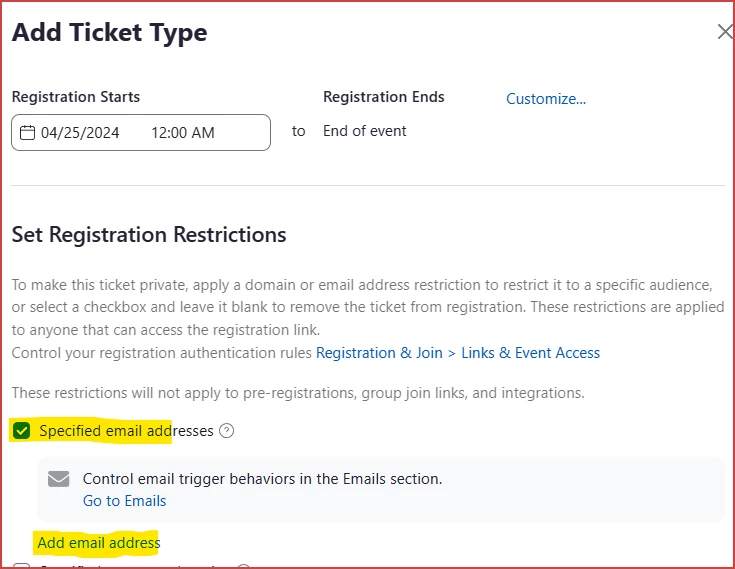
    There are several ways to do this in a Zoom Event.  If you want everyone who registered for the external package to have access, you can import their email addresses into a specific ticket type.  Create a "Package Deal" ticket, click the Specified Email Addresses box, and import the Email addresses:


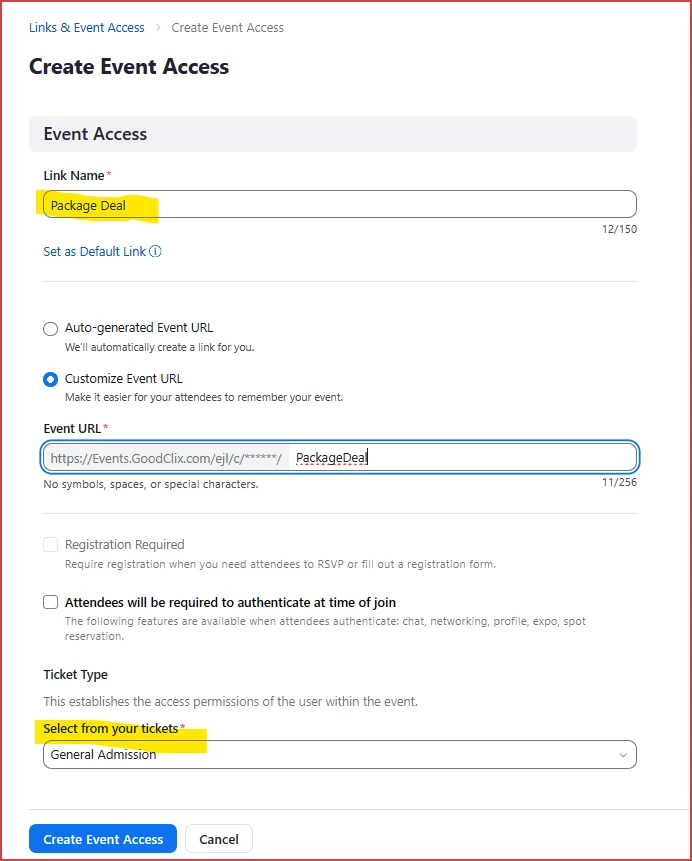
    Another way is to create a special ticket type and send the ticket-specific link to them via Email.  Note that they are able to forward this link to others, so I'd only do this with "trusted purchasers".  Here's how to create the "Event Access" (with a custom link):

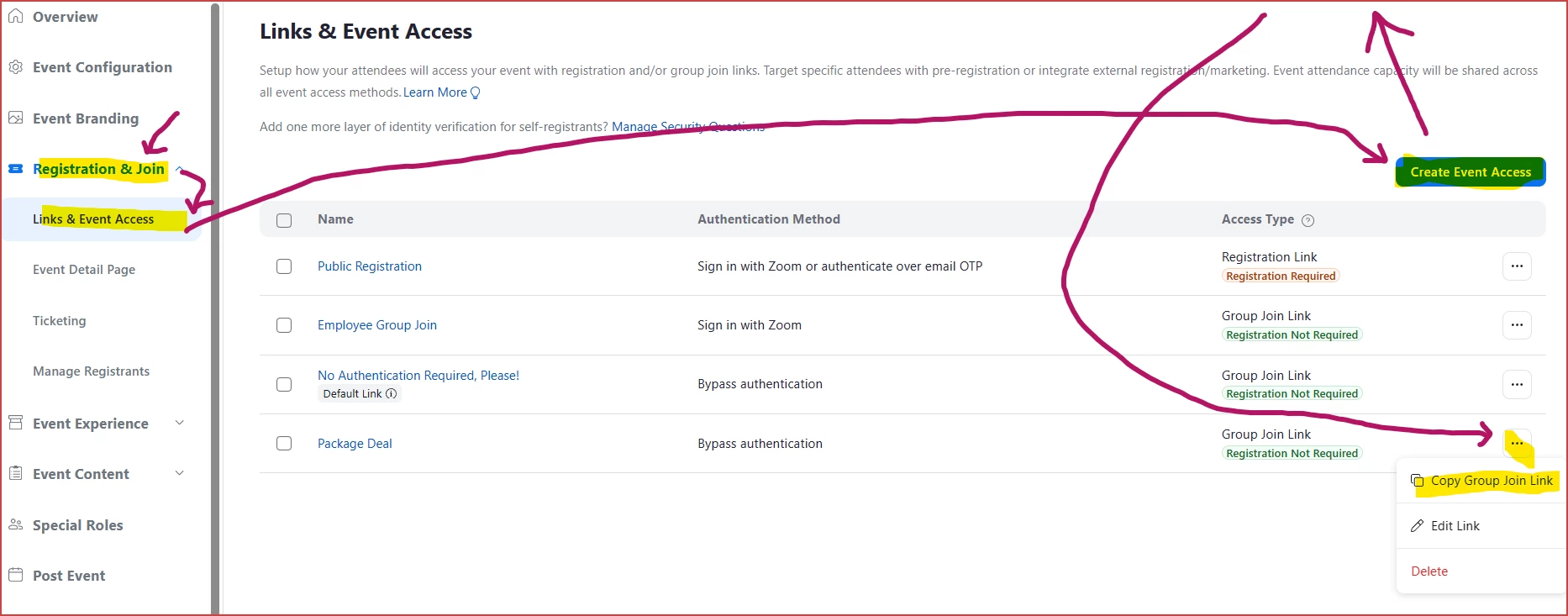
    This is where you start, and also where you grab the link to send to eligible people.


    Reach out to me if you'd like some other ideas... but those two are my top recommendations.

    2 replies

    Ray_Harwood
    Community Super Champion | Customer
    Community Super Champion | Customer
    April 26, 2024

    Welcome to the Zoom Community, @chimera.


    There are several ways to do this in a Zoom Event.  If you want everyone who registered for the external package to have access, you can import their email addresses into a specific ticket type.  Create a "Package Deal" ticket, click the Specified Email Addresses box, and import the Email addresses:


    Another way is to create a special ticket type and send the ticket-specific link to them via Email.  Note that they are able to forward this link to others, so I'd only do this with "trusted purchasers".  Here's how to create the "Event Access" (with a custom link):

    This is where you start, and also where you grab the link to send to eligible people.


    Reach out to me if you'd like some other ideas... but those two are my top recommendations.

    Newcomer
    May 31, 2024

    Hi, is it possible to do the same with webinars? I cannot see any of the features you mentioned on the webinar set up. Many thanks.

    Ray_Harwood
    Community Super Champion | Customer
    Community Super Champion | Customer
    May 31, 2024

    Welcome to the Zoom Community, @Rhubbarb.


    These examples are for Zoom Events/Sessions only, as you’ve figured out. 

    Is your goal to have both free and paid access to a webinar?  There are only two ways I can think of to do this:

    •  Use external registration like Eventbrite, which can feed registration data into Zoom Webinars. Create separate tickets there, one free, one paid.
    • Have paid registrations done with Zoom registration, but have those that want free attendance email you directly, collect their info manually, then upload their registration data into the Zoom Webinar registration via CSV.  (I haven’t tried this, but pretty sure it will work.)
    chimeraAuthor
    Newcomer
    April 26, 2024

    Thank you for your help!