change a meeting into a webinar | Community
Skip to main content
Newcomer
January 10, 2022
Solved

change a meeting into a webinar

  • January 10, 2022
  • 1 reply
  • 7 views

Hello,


We have created a meeting but it seems that a webinar could be a better idea.

So, is it possible to change a meeting into a webinar?


Thanks!

    Best answer by Arps

    Hello!


    Here's the process to convert a meeting to a webinar: https://support.zoom.us/hc/en-us/articles/360042761551-Converting-meetings-and-webinars


    1. Sign in to the Zoom web portal.
    2. In the navigation panel, click Meetings
    3. Click the name of the meeting you would like to convert to a webinar. 
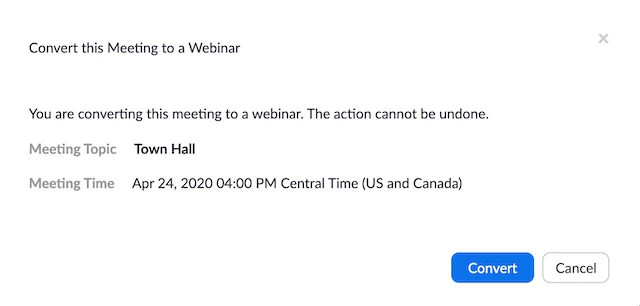
    4. To the right of the Start and Edit buttons, click Convert this Meeting to a Webinar


    5. Confirm that you want to convert this meeting to a webinar by clicking Convert.


    Hope that helps and please make sure to mark the solution as accepted if this information is what you needed.

    Thanks! Rick

    1 reply

    Arps
    Community Champion | Employee
    ArpsAnswer
    Community Champion | Employee
    January 10, 2022

    Hello!


    Here's the process to convert a meeting to a webinar: https://support.zoom.us/hc/en-us/articles/360042761551-Converting-meetings-and-webinars


    1. Sign in to the Zoom web portal.
    2. In the navigation panel, click Meetings
    3. Click the name of the meeting you would like to convert to a webinar. 
    4. To the right of the Start and Edit buttons, click Convert this Meeting to a Webinar


    5. Confirm that you want to convert this meeting to a webinar by clicking Convert.


    Hope that helps and please make sure to mark the solution as accepted if this information is what you needed.

    Thanks! Rick

    Newcomer
    April 19, 2022

    What if the Convert option isn't there? I see start edit delete. Is there a setting I should change in the background? (I have a meeting and webinar license for 500)