

ウェビナーで共同ホスト、パネリストも、画面共有時、サウンドの共有ができるようにする設定方法について | Community
Skip to main content
Rurico
Explorer
Explorer
May 17, 2026
Question

ウェビナーで共同ホスト、パネリストも、画面共有時、サウンドの共有ができるようにする設定方法について

  • May 17, 2026
  • 1 reply
  • 96 views

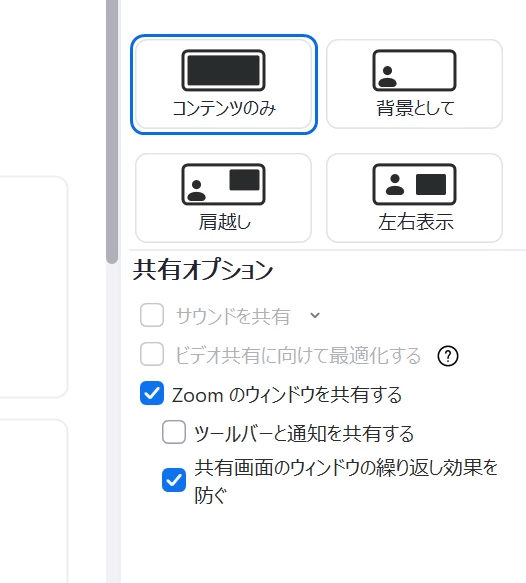
添付画像のように、

グレーアウトになってサウンド共有のチェックができなくなっています。


解消方法が知りたいです!

よろしくお願いいたします。
 

1 reply

aluyun
Community Manager
Community Manager
May 18, 2026

Hi ​@Rurico,


Thank you for your contributions! 

When Multiple participants can share simultaneously is enabled in a webinar, Zoom will gray out some share options—including Share sound—so you can’t toggle them. 


Fix

  1. In the webinar, click the arrow next to Share Screen.
  2. Open Advanced Sharing Options…
  3. Turn OFF Multiple participants can share simultaneously (set it so only one participant can share at a time).
  4. Start screen sharing again and check Share sound—it should be selectable.
     

You can check out this link for more information.

