

Chat sound notification | Community
Skip to main content
Newcomer
January 6, 2022
Question

Chat sound notification

  • January 6, 2022
  • 20 replies
  • 50 views

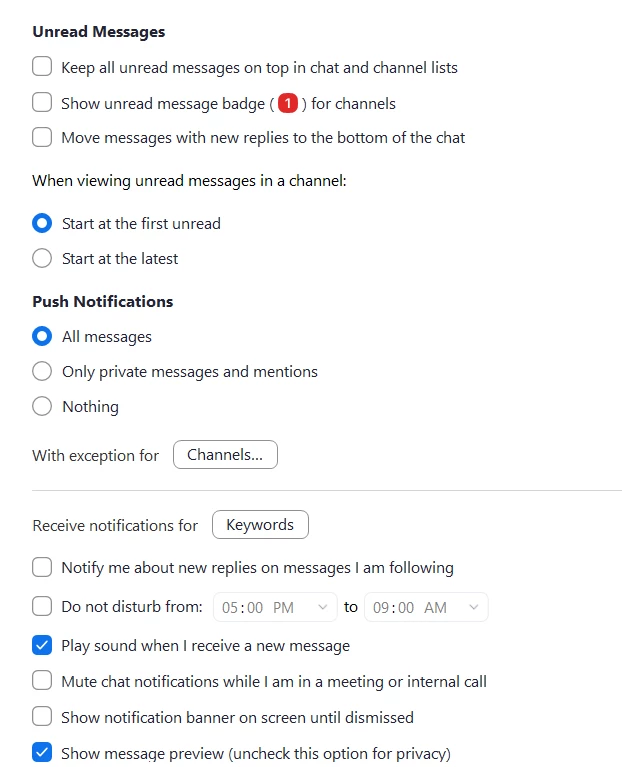
I have my chat sound notification box enabled but still do not hear any sounds when someone chats in zoom.  Here is a screenshot of my settings.  All other chimes and notifications are working - like when someone enters or leaves a meeting. 


    20 replies

    igorn
    Employee
    Employee
    January 6, 2022

    Hello!


    It sounds like you are looking for to enable sound notification for meeting chat. This setting is referring to persistent Zoom Chat. 


    Newcomer
    January 6, 2022

    Is there a way to enable chat sounds while in a meeting? We have online students chatting but I also have a live class I need to be able to hear when they enter something in the chat. Is there a setting to help with this?


    igorn
    Employee
    Employee
    January 6, 2022

    Unfortunately not a feature today.

    Newcomer
    February 11, 2022

    I am not understanding the response.  I have the same question as above.  I have "play sound when I receive a new message" selected but for some reason I hear nothing.  This used to "ding" when someone messaged me in chat...so you know you have a message...now nothing.  Please advise how to get this working again

    Newcomer
    June 10, 2022

    I have found that I only get the new chat message "ding" only if the zoom chat app is not "active" (meaning other programs, apps, files, etc are opened on top of it).  Once I bring focus to the zoom app then I am not alerted when new chat messages are received.  The suggestion below to change the focus notifications would be great IF the zoom app was an option, but it is not.

    Newcomer
    April 14, 2022

    Hi – I've figured this out as I was having the same issue on one Mac but not my other.  You have to go to your System Preferences > Notifications & Focus. Select the Zoom app in the sidebar and then toggle to Allow Notifications.

    Newcomer
    April 21, 2022

    Zoom is not appearing in the list for Notifications.  I'm running Windows 11...

    Newcomer
    April 23, 2022

    I have the same problem on Windows 10. No sound when someone sends a chat message. 😞

    Newcomer
    August 15, 2022

    I recently encountered this issue on my mac, turns out the reason that I wasn't hearing any sounds was because zoom notifications had been turned off the the Notifications and Focus settings on Mac OS. Hope this helps anyone else. 

    Newcomer
    September 16, 2022

    I've allowed notifications for Zoom on my Mac, but I still can't hear sounds. Has anyone found a different solution?

    Newcomer
    September 26, 2022

    same. this is driving me up a wall.

    Newcomer
    September 29, 2022

    Same here.  I can't get it to work either.

    Newcomer
    January 3, 2023

    I am also on Mac (OS 12.6 Monterey) and I have Zoom Notifications "Play Sound for Notifications" enabled in System Preferences, but I do not get a sound when one of my students sends me a PM in the Zoom Chat.


    Getting a sound ("ding" or whatever it may be) when someone sends you a message in the Zoom Chat is a very desirable feature and I hope Zoom will enable this feature for all users .

    Newcomer
    January 3, 2023

    I hope that too.

    Newcomer
    January 3, 2023

    Ideally, Zoom should use the same system as all the other messaging apps: the notification center.

    Newcomer
    January 3, 2023

    What I am experiencing is that I will hear an "ding" when a new chat message is received only if the zoom application isn't in the fore-front program (i.e. it is minimized to the tool bar area) and then only if the person sending the chat message isn't the "active" contact.  For me, zoom is a primary communication tool so the program is always active and open on a separate screen.  This means I only know if I have a new message is if I glance at it and see the red dot indicator for new messages. I wish it operated more similarly to outlook which makes an audible sound notification for any newly received email regardless of whether it is the active program or somewhere in the background. New message = audible notification...wish new chat also = audible notification...

    Newcomer
    January 26, 2023

    Absolutely. A very good description of what is needed and requested.