


Physical phone (on the ZTP list) capable of Zoom Video calls | Community
Skip to main content
Boyan
Explorer
Explorer
February 1, 2023
Solved

Physical phone (on the ZTP list) capable of Zoom Video calls

  • February 1, 2023
  • 5 replies
  • 1 view

Hi everyone,


I'm looking for a recommendation of physical phone (on the ZTP list) capable of Zoom Video calls. We do have Zoom phone system and usually use one of the low end Poly models that work fine with voice but I want a higher end phone which possibly can do Zoom video - obviously the thing would come with decent size LCD and a camera?


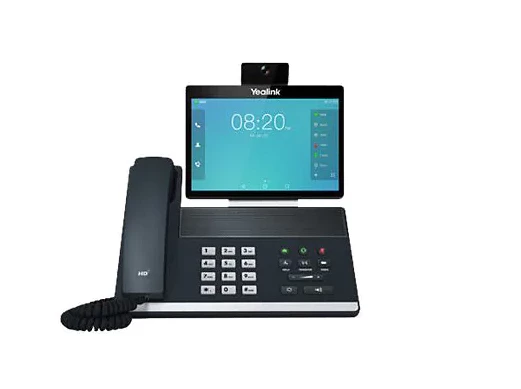
Example - Yealink VP59 device but it's unclear as to exactly whether it can do what I want.

Thanks

Boyan
 

    Best answer by sachinzoom

    Hi Boyan,

    Yes to your fist 3 questions. However, SMS is on the roadmap but not committed yet.


    If this helps, please accept the answer as an accepted solution.

    5 replies

    FORE-Craig
    Specialist
    Specialist
    February 1, 2023

    Hi @Boyan 


    We have Yealink VP59s in Zoom Phone Appliance (ZPA) mode, that obtained from Zoom directly. I would venture to say that the quality of the audio and video really very good. If you have a Zoom Meeting in your linked calendar, it will even remind you prior to the meeting and show you the option to join the meeting. You can also directly start a Zoom Meeting the the Zoom Phone Appliance  interface. The display is certainly not as large as that of a computer, so viewing a large number of participants, or shared screens is rather small. The camera is not built-in to the display. They plug into the top of the display, and there is a manual privacy slider on the camera to switch bit off. 

    Some things to be aware of with the VP59 and all phones that do ZPA is that they currently do not link in your Google/Exchange/Outlook 365 contacts, only the External, and Personal Contacts set up on the Zoom web portal. The ZPA software also has not yet been updated to allow Call Control (click to dial) from your computer. 

    I hope that helps! 

    DoctorWho
    Newcomer
    Newcomer
    February 1, 2023

    Hi @Boyan ,


    unfortunately I'm not deep enough into zoom phone hardware, but you may have a look at the Grandstream Andorid Desk Phones.

    They are able to install zoom at (least via the apk) and then you can use the full zoom experience with video-calls and even chats.


    But maybe there is some expert out there who can answer us this question better :).


    Best,

    DoctorWho

    Community Champion | Employee
    February 1, 2023

    Hello,


    My recommendation is to go with Zoom phone appliances (ZPA ) that can do video:


    https://support.zoom.us/hc/en-us/articles/360059251252-Getting-Started-with-Zoom-Phone-Appliances


    Here are certified devices. Yealink VP59 can also be configured as a ZPA 


    https://support.zoom.us/hc/en-us/articles/360059251252-Getting-Started-with-Zoom-Phone-Appliances

    If this helps, please accept the answer as an accepted solution.

    Boyan
    Explorer
    BoyanAuthor
    Explorer
    February 1, 2023

    Hi everyone, very helpful, thank you. So looks like ZPA is the thing - one quick clarification. ZPA does NOT require Zoom Room license and a ZPA phone can also function like a normal low-end Zoom voice-only phone, yes? Dialing digits using the keypad and answering an coming PSTN call to the phone number associated with the Zoom phone?


    Lastly do any of the ZPA devices support SMS in any way? In/out? Whatever support might exist?

    Community Champion | Employee
    February 1, 2023

    Hi Boyan,

    Yes to your fist 3 questions. However, SMS is on the roadmap but not committed yet.


    If this helps, please accept the answer as an accepted solution.

    FORE-Craig
    Specialist
    Specialist
    March 31, 2023

    Hi @Boyan 


    Since I saw this post that I previously made in this same feed, I wanted you to know that Call Control (click to dial) from your computer, and integration of Google/Exchange/Outlook 365 contacts are now working in the ZPA interface for the Yealink VP59. 😊 


    I hope that helps!