
Zoomtopia is here. Unlock the transformative power of generative AI, helping you connect, collaborate, and Work Happy with AI Companion.
Register nowEmpowering you to increase productivity, improve team effectiveness, and enhance skills.
Learn moreKeep your Zoom app up to date to access the latest features.
Download Center Download the Zoom appDownload hi-res images and animations to elevate your next Zoom meeting.
Browse Backgrounds Zoom Virtual BackgroundsEmpowering you to increase productivity, improve team effectiveness, and enhance skills.
Zoom AI CompanionUser groups are unique spaces where community members can collaborate, network, and exchange knowledge on similar interests and expertise.
Help & Resources is your place to discover helpful Zoom support resources, browse Zoom Community how-to documentation, and stay updated on community announcements.
The Events page is your destination for upcoming webinars, platform training sessions, targeted user events, and more. Stay updated on opportunities to enhance your skills and connect with fellow Zoom users.
2021-10-18 10:14 PM
share screen not work; error code 117001
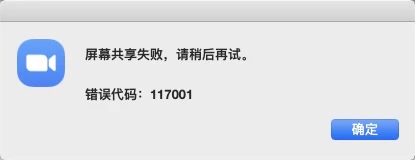
system version: MacOS 10.15.7 (19H1417)

2021-10-19 04:13 PM
Hi!
For this I would recommend opening up a support case.
You can do this by visiting https://zoom.us/requests/new or clicking the chat bot at the bttom of the support page.
After clicking the chat icon, you can type connect to live agent. Then the bot will give you a list of options. From there you can type or select support.
Additionally, if you are on the business plan you can get support over the phone by calling 888-799-5926 and entering your host key.
Hope this helps answer your question.
Best: Pizzalover28