

Trying to share the zoom chat window | Community
Skip to main content
Newcomer
March 23, 2022
Solved

Trying to share the zoom chat window

  • March 23, 2022
  • 2 replies
  • 0 views

The issue is host starts the meeting, and enters something in chat. When participant#2 joins, they dont see the chat message. And when participant#3 joins, they won't see the chat message that was typed before by the other 2 people. 

I thought of sharing the zoom chat window, but that does NOT show up in the shared window. I even tried the portion of the screen. 

So on settings of the account, I enabled "Show Zoom windows during screen share" but that didn't make any difference. 


Thoughts? I don't know how to solve this issue?
    Best answer by zac2021

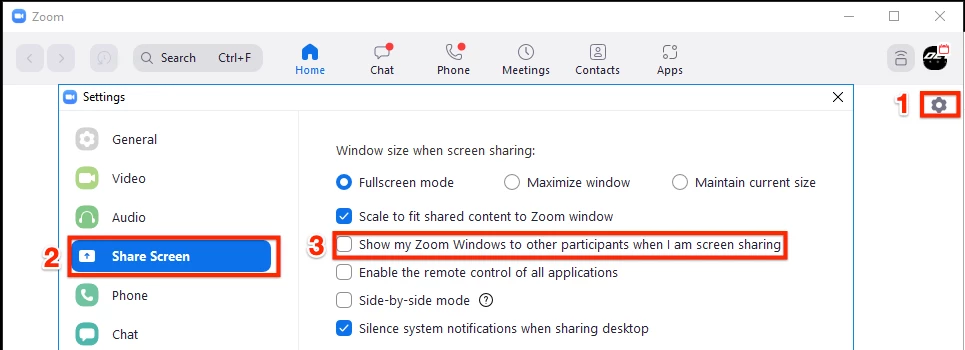
    @edmondme From the host Zoom App (or whoever is sharing the screen), you can try to enabling "Show my Zoom Windows to other participants when I am screen sharing."


    Settings > Share Screen


    Detailed steps can be found here.

    _______________________________________________________

    Leverage cool features and how to's from the Community Help Center. If my reply helped, don't forget to click the accept as solution button! ⤵️


    2 replies

    zac2021Answer
    Community Champion | Employee
    March 24, 2022

    @edmondme From the host Zoom App (or whoever is sharing the screen), you can try to enabling "Show my Zoom Windows to other participants when I am screen sharing."


    Settings > Share Screen


    Detailed steps can be found here.

    _______________________________________________________

    Leverage cool features and how to's from the Community Help Center. If my reply helped, don't forget to click the accept as solution button! ⤵️


    edmondmeAuthor
    Newcomer
    March 24, 2022

    That worked!