

I can't update Zoom on my MacBook | Community
Skip to main content
Newcomer
August 7, 2023
Solved

I can't update Zoom on my MacBook

  • August 7, 2023
  • 7 replies
  • 5 views

When I try to open Zoom on my MacBook, I get a message that reads "Your app version needs to be 5.12.2 or higher to sign in.  Please update to continue."  When I try to update, however, I get another message that says "Unable to install updates.  Error code: 10004."  Can anyone give me some advice for what to do?  Thank you!
Best answer by awarsoca

OK all, here is how I fixed it, the below was a little off so I'll tell you where I changed it:


Hi @awarsoca @mgoldax2023 gotcha! Lets try this.. 

  • Please go to Privacy & Security   —> full disk access —> Installer and then enable Privacy & Security   -> Files and Folders —> Installer—>Downloads folder.
  • After enabling these options please reboot your device and try installing the Zoom desktop client app again.

Note:
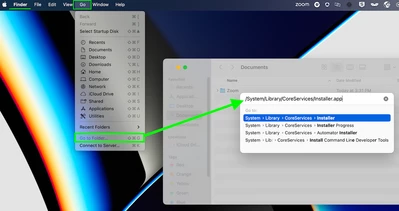
If the installer is not seen at the above location, please add it manually by going to Finder > Go > Go to  Folder...- key in /System/Library/CoreServices/Installer.app and then add the installer once the option is listed.


There are also a couple of discussions around this with some troubleshooting content with some success! 


Hope this helps! 


I did this instead 
  • Please go to Privacy & Security   —> full disk access —> enable us.Zoom.
  • After enabling these options please reboot your device and try installing the Zoom desktop client app again.

Rebooted and tried the pkg in download.  I tried to enable all users but it failed (probably IT admin lockdown).  I then went to finder, go (as above) and navigated as it was shown.  went to the pkg in downloads and installed for myself only and I am good go with Zoom.


 Hope this helps

7 replies

Newcomer
August 7, 2023

I ran into same problem this morning and never had such issue before. Is it possible Zoom was having an internal issue? Susan

Newcomer
August 7, 2023

I'm having the same issues. It wzs minor in the beginning, but it has become s bigger problem Unfortunately I along with many other people, we rely on you all to much. We use your services to accomplish many things.

Newcomer
August 7, 2023

me too! How do we get help? Tried to reinstall but can't do that anymore either


Newcomer
August 7, 2023

I have the same issue and put in a ticket. No help via chat or phone!


Newcomer
August 7, 2023

Thanks! Please post if you get an answer. I tried to uninstall and reinstall and that didn't work either

Newcomer
August 10, 2023

Do you have a recent Mac?

My MacBook Air has an M2 chip so I went to https://zoom.us/download in Safari and downloaded 5.15.6 (21146) choosing "Or, for Macs with Apple Silicon chips, click here to download"

awarsocaAnswer
Newcomer
August 10, 2023

OK all, here is how I fixed it, the below was a little off so I'll tell you where I changed it:


Hi @awarsoca @mgoldax2023 gotcha! Lets try this.. 

  • Please go to Privacy & Security   —> full disk access —> Installer and then enable Privacy & Security   -> Files and Folders —> Installer—>Downloads folder.
  • After enabling these options please reboot your device and try installing the Zoom desktop client app again.

Note:
If the installer is not seen at the above location, please add it manually by going to Finder > Go > Go to  Folder...- key in /System/Library/CoreServices/Installer.app and then add the installer once the option is listed.


There are also a couple of discussions around this with some troubleshooting content with some success! 


Hope this helps! 


I did this instead 
  • Please go to Privacy & Security   —> full disk access —> enable us.Zoom.
  • After enabling these options please reboot your device and try installing the Zoom desktop client app again.

Rebooted and tried the pkg in download.  I tried to enable all users but it failed (probably IT admin lockdown).  I then went to finder, go (as above) and navigated as it was shown.  went to the pkg in downloads and installed for myself only and I am good go with Zoom.


 Hope this helps
Newcomer
September 26, 2023

Full Disk Access worked for me; I had to toggle Zoom related application on.

Newcomer
August 10, 2023

Got it working! Thank you!