

Branding Domain Verification Parameters | Community
Skip to main content
Newcomer
June 28, 2024
Solved

Branding Domain Verification Parameters

  • June 28, 2024
  • 1 reply
  • 0 views

Can someone tell me the actual DNS records to use for domain name verification?


I'm trying to verify our domain name, and it seems like there's incomplete and conflicting information. The instructions in the verification popup give me a domain-level TXT record, OK that's done. Then it says it wants a CNAME to "events-branding.zoom.us," but doesn't give me a subdomain for that CNAME record. If I try to use "events-branding" as the subdomain for the CNAME record, then in the verification failure error message it says my A record was not found. But they didn't tell me to create an A record! And over in a help document, it says to create a different TXT record for a subdomain as well as an A record, but doesn't give me an IP address to point the A record to!


So, could someone who has successfully verified their domain for branding share what DNS records they created?
    Best answer by Ray_Harwood

    Welcome to the Zoom Community, @si_jdean.


    I assume you’re working from this Zoom Support article:

    https://support.zoom.com/hc/en/article?id=zm_kb&sysparm_article=KB0057580 


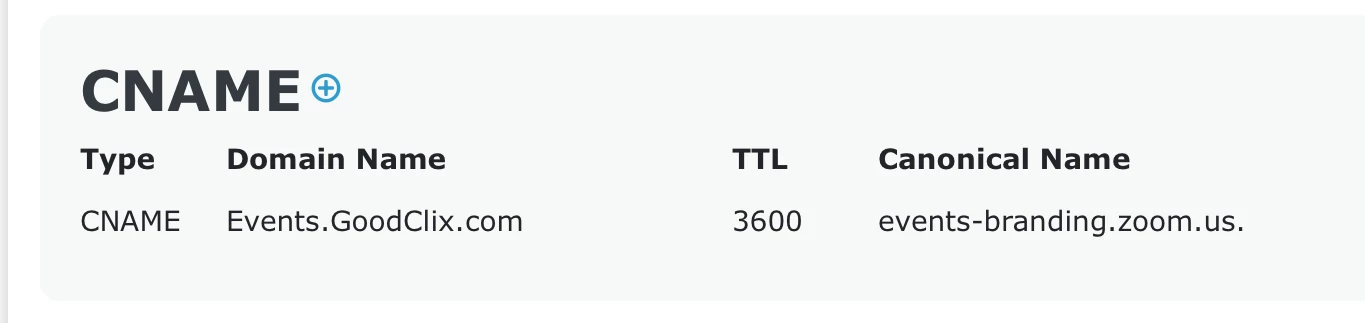
    In my case, my main web site is GoodClix.com, and I want to use Events.GoodClix.com for the custom domain name. I’ll assume you’re doing the same by using a sub domain of your main domain.  Make the CNAME record for the sub domain name you want to use as custom. In most DNS editors, this is done by adding the CNAME record to just the subdomain name; this is from dnschecker.com, which lists the fully-qualified domain name:

    Do you have your SSL cert yet?


    Feel free to reach out to me on the Z-SPAN web site (schedule 30 minutes or fill in the name/email form). 

    #   #   #


    NOTE: The following text was included in my original answer in June of 2024, but the Zoom documentation reference to the A record has been corrected.  PLEASE IGNORE THIS INFORMATION, provided here only for historical reference.  DO NOT create the A record, only the TXT and CNAME records.


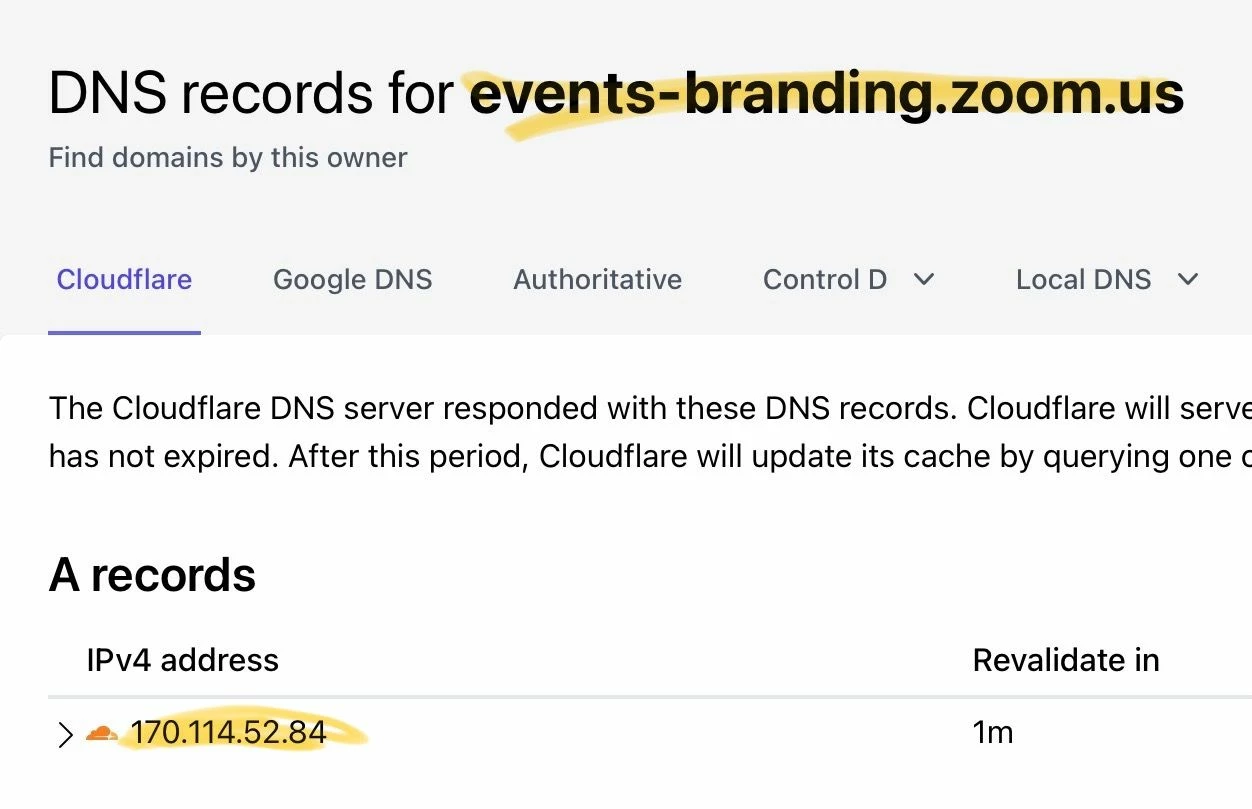
    Zoom doesn’t understand that having both CNAME and A records for any domain is technically invalid, and CNAME will take precedence (see this). But I’m guessing their validity-check routine requires both to pass. Use any NSLOOKUP site to get the IP address of events-branding.zoom.us, and put that in the A record for your subdomain. On nslookup.io:

    then back on dnschecker:

    1 reply

    Ray_Harwood
    Community Super Champion | Customer
    Community Super Champion | Customer
    June 29, 2024

    Welcome to the Zoom Community, @si_jdean.


    I assume you’re working from this Zoom Support article:

    https://support.zoom.com/hc/en/article?id=zm_kb&sysparm_article=KB0057580 


    In my case, my main web site is GoodClix.com, and I want to use Events.GoodClix.com for the custom domain name. I’ll assume you’re doing the same by using a sub domain of your main domain.  Make the CNAME record for the sub domain name you want to use as custom. In most DNS editors, this is done by adding the CNAME record to just the subdomain name; this is from dnschecker.com, which lists the fully-qualified domain name:

    Do you have your SSL cert yet?


    Feel free to reach out to me on the Z-SPAN web site (schedule 30 minutes or fill in the name/email form). 

    #   #   #


    NOTE: The following text was included in my original answer in June of 2024, but the Zoom documentation reference to the A record has been corrected.  PLEASE IGNORE THIS INFORMATION, provided here only for historical reference.  DO NOT create the A record, only the TXT and CNAME records.


    Zoom doesn’t understand that having both CNAME and A records for any domain is technically invalid, and CNAME will take precedence (see this). But I’m guessing their validity-check routine requires both to pass. Use any NSLOOKUP site to get the IP address of events-branding.zoom.us, and put that in the A record for your subdomain. On nslookup.io:

    then back on dnschecker:

    si_jdeanAuthor
    Newcomer
    June 29, 2024

    Thanks so much for your response. Two things you said that did it: I misunderstood what I was verifying, I was just using our domain name, not a subdomain. Our domain name obviously already has an A record! The other thing was creating an A record for the subdomain to the IP address for the Zoom events URL. It wouldn't let me add both a CNAME and an A record for the same subdomain, and when I just did a CNAME it didn't take that. Thanks again for your help!

    Ray_Harwood
    Community Super Champion | Customer
    Community Super Champion | Customer
    June 29, 2024

    Excellent, @si_jdean.  I’m confused about which record you were actually able to create in your subdomain: CNAME or A Record? Did you pass the verification step?


    Note added March 3, 2025:  There is no need for an A record; only the CNAME and TXT records.
