

"This meeting is for authorized attendees only" when Security configurations are disabled | Community
Skip to main content
Newcomer
January 18, 2022
Solved

"This meeting is for authorized attendees only" when Security configurations are disabled

  • January 18, 2022
  • 4 replies
  • 8 views

When we invite others to join a zoom meeting, they have been receiving the pop up with written "This meeting is for authorized attendees only". It would make sense if would have this enabled in our meeting security configuration, but all our settings related to authorised attendees are off:
- Only authenticated users can join meetings from Web client: OFF
- Only authenticated panelists can join webinars
- Only authenticated meeting participants and webinar attendees can join meetings and webinars


We previously did not have this issue. What could the problem be given that we have not set this up in the settings? 


Benedetta
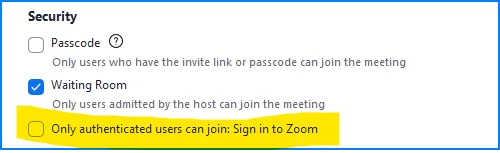
    Best answer by BirdieOps

    That screen shot I sent is from the web view of your meeting in Edit mode.  If you're editing the meeting in the Zoom client, it looks like this:

    Again... this is a setting on the meeting itself, in Edit view of the meeting.  It's not a Zoom setting in the Zoom Settings screen.


    Hi Raj thank you very much. 

    My view was a bit different, but I managed to resolve it by having to enter from the user's zoom account (it didn't work from the admin seat). The wording of the settings was a bit different as I couldn't find those you display but we disabled everything that included "autheticated". 
    Then, for it to work, we had to refresh and wait a few seconds 

    4 replies

    Ray_Harwood
    Community Super Champion | Customer
    Community Super Champion | Customer
    January 19, 2022

    You didn't specifically mention if this option in the meeting settings is checked:

    That is separate from the user and account settings you mentioned.

    BirdieOpsAuthor
    Newcomer
    January 19, 2022

    Hi Ray, 


    I don't have that option on the zoom settings. However, all that has "authentication" is turned off so I'm not sure where to look.

    Ray_Harwood
    Community Super Champion | Customer
    Community Super Champion | Customer
    January 19, 2022

    That screen shot I sent is from the web view of your meeting in Edit mode.  If you're editing the meeting in the Zoom client, it looks like this:

    Again... this is a setting on the meeting itself, in Edit view of the meeting.  It's not a Zoom setting in the Zoom Settings screen.

    Newcomer
    January 20, 2022

    Hi, I'm having a similar problem with my university's Zoom links.

     
    I've been attempting to enter class Zoom meetings and I'm met with an alert to switch to a 'recognizable Zoom account' for the private meeting. The only zoom account I have has worked with other classes, and my attempts to sign in with a new account with my university email username, one I assumed would be more recognizable to the campus records, was also denied. The sequence keeps repeating and I've missed 3 late morning/afternoon classes. The access worked for one of my 5:30pm classes last night but the issue repeated this afternoon.  Is there a way to let me in and update the information so it doesn't happen again?
     
    Newcomer
    March 23, 2022

    Same exact problems. Missed university class last night. Were you able to fix it, at the university-wide level?

    BirdieOpsAuthor
    Newcomer
    January 28, 2022

    Hey, 


    In my case it was a bit different as we were the hosts and people couldn't get in our meetings. What I found out (in our case) is that it's a problem of the host settings. 

    Like in your case, the problem I had was that the host could let some people in and others not - and the general zoom settings were all good. 

    I suggest you ask the teacher if she can disable all zoom settings which contain "authent" (e.g. aunthentication, authenticated..). Also, once that's done, it might not work immediately so try refreshing or copying & pasting the link (from the meeting to a url)


    Hope it helps!

    Newcomer
    March 23, 2022

    I am having the very same problem! Missed class last night... 😕😕