

Translation Captions Settings and funtion | Community
Skip to main content
Newcomer
October 24, 2022
Solved

Translation Captions Settings and funtion

  • October 24, 2022
  • 6 replies
  • 0 views

Hello,


I just installed Translation Caption Add-On to my working account. 


I am trying to translate from German to English on once side and in the other from English to German...


Unfortunately, I feel this Add-On is still not well developed due to being such a new setting, and it only works on one side.


I feel that the translation is happening alone on each computer and not in the Zoom meeting for both persons...


Has anyone have experience with this Add-On and can help me find the best settings for my Zoom-Meetings?


Most appreciated,

CG
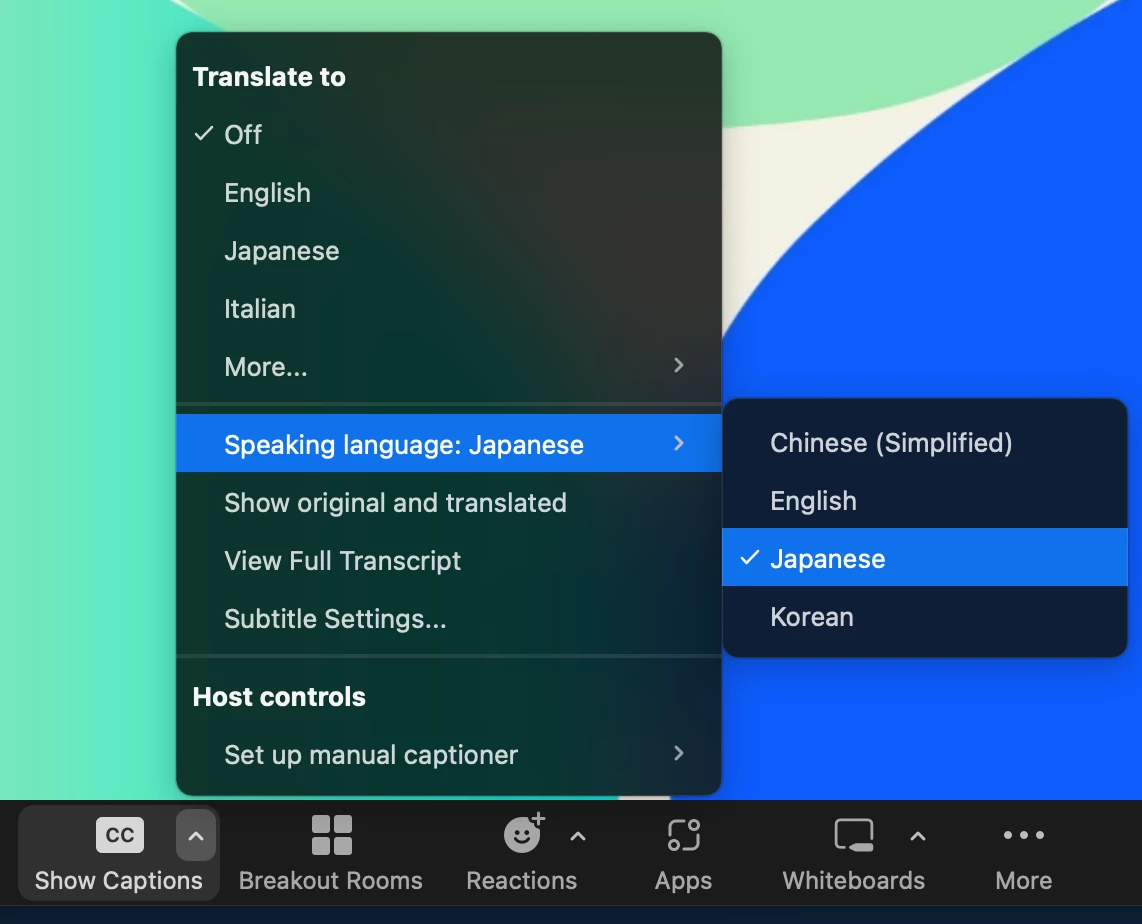
    Best answer by ZOT

    Unfortunately, I don't speak German so I haven't tried, but the part of the screenshot below should be set to the language spoken by the participant who set it up. A common mistake is often setting the language spoken in the meeting (not the language spoken by the participants).


    6 replies

    ZOTAnswer
    Community Champion | Employee
    October 26, 2022

    Unfortunately, I don't speak German so I haven't tried, but the part of the screenshot below should be set to the language spoken by the participant who set it up. A common mistake is often setting the language spoken in the meeting (not the language spoken by the participants).


    Newcomer
    November 8, 2022

    I'm also having trouble with translated captions. They are not working at all for English to Mandarin or Mandarin to English. It gives almost all gibberish.

    Newcomer
    November 9, 2022

    I finally discover that the solution by my problem is that for the translation to work, both the "translation to" and "speacking language" need to be the same! For exemple: from english to Mandarin, if you want to read in english, both your "speacking language" and "translation to" language need to be english! And the other way around!


    Hope I could help!

    Newcomer
    August 5, 2023

    How were you able to setup that configuration?

    Newcomer
    August 5, 2023

    I am looking at the possibility of translation from English to Spanish and Spanish back to English. Is that possible is so, what do I need to make it happen.

    Newcomer
    August 7, 2023

    First you need to by the pacage for "Zoom Translation Caption".


    You can find it here:

    https://zoom.us/pricing


    Good luck!

    Explorer
    August 28, 2023

    So far the best way I have found is to make sure everyone has "show original and translated" enabled (found under "Your caption settings" just below "my speaking language"). This means you will see a line of captioning that you don't need (in your case the German you are speaking) but at least everyone can see the translation as well. 

    Hope that helps...