


cancel
Showing results for 
Search instead for 
Did you mean: 
The Zoom Community will be placed in read-only mode January 9th, 2026 through January 22nd, 2026 to deliver you a new and improved community experience!

The community will still be accessible, however, the creation of any new discussions or replies will be temporarily unavailable. We appreciate your patience during this time.

Save recording to Vimeo to save Zoom Storage

Ed_AA_Ltd
Explorer
Explorer

Hello!


I have linked Zoom to my Vimeo account and automatically upload the recording to Vimeo.


I have limited Zoom storage, and the recording also saves to my Zoom Cloud, so I have to go in after every meeting and delete the recording on Zoom.


Can anyone advise if there is a setting whereby I can continue to upload automatically to Vimeo without also saving to the Zoom cloud?


Thank you!
 

1 ACCEPTED SOLUTION

Ohkawa
Community Champion | Customer

Hi,Ed_AA_Ltd

How about using auto-delete to look at it?

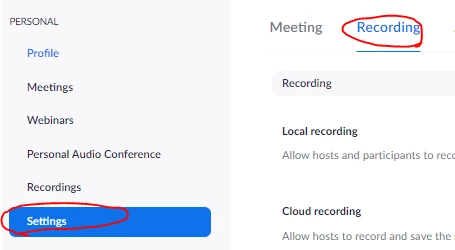
https://zoom.us>Settings>Recording>Auto delete cloud recordings after days>set 1 day

Ohkawa_0-1629880608258.png


Ohkawa_1-1629880712860.png


View solution in original post

3 REPLIES 3

Ohkawa
Community Champion | Customer

Hi,Ed_AA_Ltd

How about using auto-delete to look at it?

https://zoom.us>Settings>Recording>Auto delete cloud recordings after days>set 1 day

Ohkawa_0-1629880608258.png


Ohkawa_1-1629880712860.png


Thank you Ohkawa,


I will use that solution. 👍


Kind regards,

Ed


KurtS
Newcomer
Newcomer

Hi,

How did you set up zoom to auto save to your View account for cloud storage?

I have a high volume 3rd party cloud storage and I'd like to set up my Zoom Pro account to auto save to that online cloud storage address.

Kurt
