

Polls not showing on recording | Community
Skip to main content
Newcomer
October 13, 2021
Solved

Polls not showing on recording

  • October 13, 2021
  • 3 replies
  • 1 view

Hi - I was testing to check functionality and that everything recorded correctly but on the video recording the sharing of polls and then poll results did not show - is this normal or is there a setting somewhere? Thx in anticipation!
    Best answer by jaustria

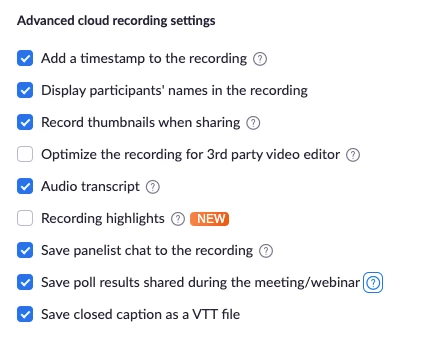
    Hi CatherineT! Welcome to Zoom Community! You might need to go here Zoom Web Portal > Settings > Recording > Advanced Cloud Recording Section and enable Save Poll Results Shared in Meeting/Webinar


    Once it’s on, you can display poll results. HOWEVER they are only shown in the recording


    A) If the host hits “Share results” for the poll in the meeting/webinar
    B) If the attendee selects a tiny tab in the bottom right corner of the recording playback window to pop open the poll results

    3 replies

    jaustria
    Community Champion | Employee
    jaustriaAnswer
    Community Champion | Employee
    October 13, 2021

    Hi CatherineT! Welcome to Zoom Community! You might need to go here Zoom Web Portal > Settings > Recording > Advanced Cloud Recording Section and enable Save Poll Results Shared in Meeting/Webinar


    Once it’s on, you can display poll results. HOWEVER they are only shown in the recording


    A) If the host hits “Share results” for the poll in the meeting/webinar
    B) If the attendee selects a tiny tab in the bottom right corner of the recording playback window to pop open the poll results

    Newcomer
    February 14, 2023

    This setting is no longer there.


    Newcomer
    February 17, 2023

    Thank you for the update. I was just looking for that feature.