
Solved
Display name
Hello,
My display name in my settings is different from my name that appears upon entering a meeting. How can I match these?
Thanks!

Hello,
My display name in my settings is different from my name that appears upon entering a meeting. How can I match these?
Thanks!
Hi, SurfWriter
If you join a Zoom meeting while you are signed in to Zoom, you will not be asked to enter the participant name, and you will join the meeting with the display name you set in your Web Portal profile.
If you join a Zoom meeting without being signed in to Zoom, a window will appear asking you for the participant name, and by default, the login ID of your PC will be set.
Of course, you can change the participant name (display name) manually. If you see a window to enter the participant name when you join a meeting, it means that you are joining without signing in.
If you sign in when you join a Zoom meeting, you will join the meeting before the sign-in information is reflected, and the display name will be the same as when you joined as a guest, and the participant name confirmation window will appear.
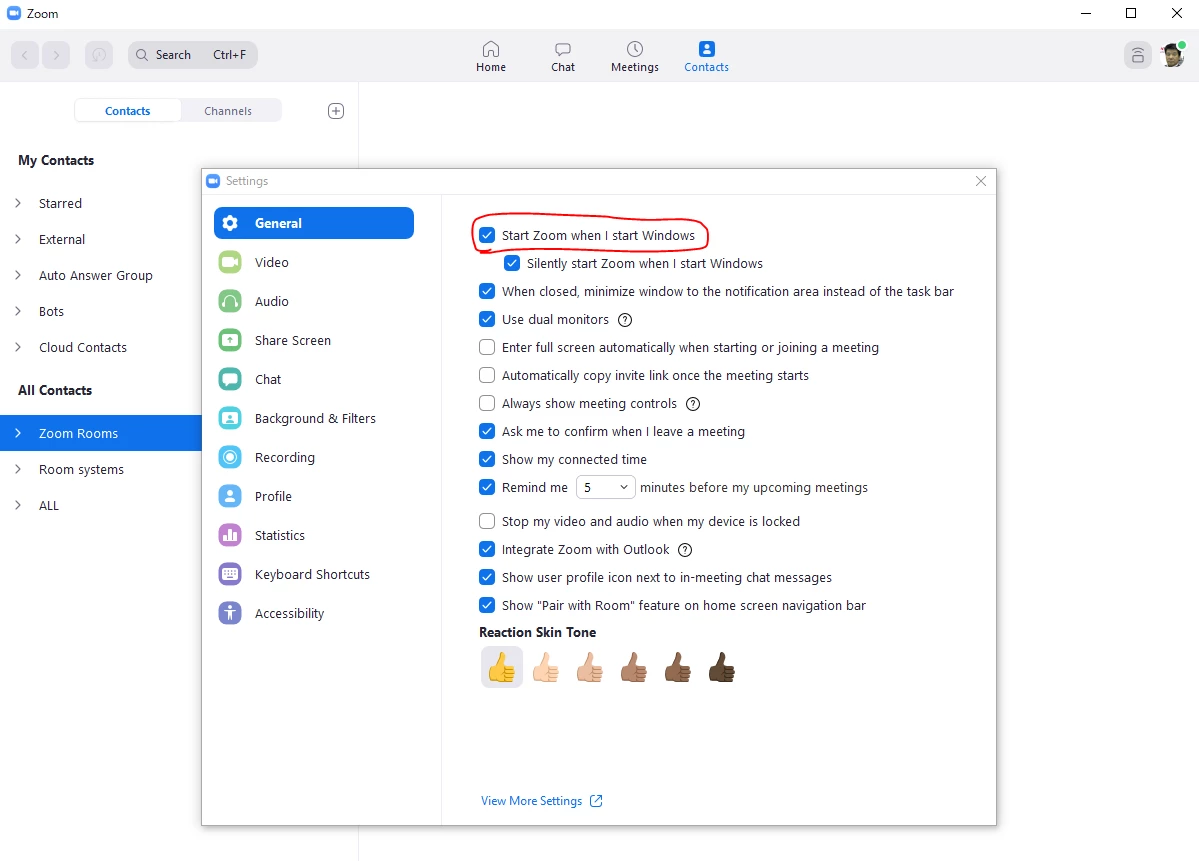
The way to prevent this is to set the Zoom application to start when the PC starts.
See below.
If this solves your problem, please click Accept as Solution.

No account yet? Create an account
Enter your E-mail address. We'll send you an e-mail with instructions to reset your password.