

Zoom Room Error Code 5 | Community
Skip to main content
Newcomer
June 5, 2026
Question

Zoom Room Error Code 5

  • June 5, 2026
  • 2 replies
  • 60 views

Our room was under construction for about 6 months and just came back online. When it came back on we keep getting the error code in the image. 
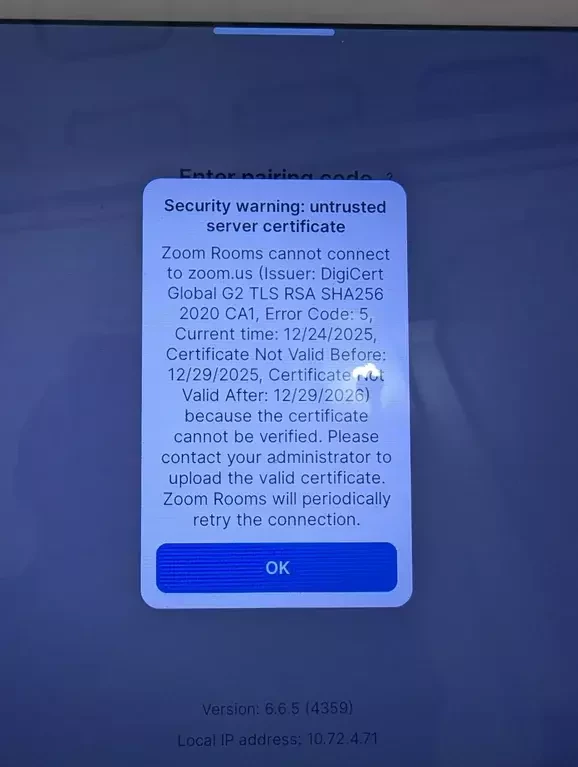
We have a Zoom room connected to a Crestron brain. I saw that error code 5 means a mismatch between the Crestron and Zoom. I changed my Zoom room to mountain time, and the engineer changed the Crestron unit to the correct time, but we're still getting this error.

I'm also trying to update the Crestron firmware through Zoom but it's getting stuck and timing out.

If the time is correct on the Crestron, could a network switch be getting in the way?

Any ideas? 

Thanks!

2 replies

aluyun
Community Manager
Community Manager
June 10, 2026

Hi ​@Tim Senese,


Thank you for reaching out and joining Zoom community. The Zoom Rooms device thinks the current date is 12/24/2025, but the certificate it’s seeing is not valid until 12/29/2025 (“Certificate Not Valid Before”). That will trigger Error Code 5 even if the time zone is correct.

So the key question isn’t Mountain Time vs another zone—it’s whether the Zoom Rooms computer/appliance itself has the correct date/time and is successfully syncing time.


Try this in order:

  1. Fix time on the Zoom Rooms device (not just Crestron)
  • On the Zoom Rooms PC/Mac/appliance OS, set:
    • correct date
    • correct time
    • correct time zone
    • enable automatic time sync (NTP) if available
  • Then reboot the Zoom Rooms device. Zoom’s guidance for Error Code 5 is to correct the system time and restart Zoom Rooms. 1
  1. If time keeps drifting or won’t sync: check network time (NTP) Since the room was offline for months, it’s common for devices to come back with a bad clock and then fail to sync if:
  • NTP is blocked
  • DHCP options changed
  • the device can’t reach your NTP servers
  1. If time is correct and it still says “untrusted certificate”: suspect TLS inspection / proxy / captive portal A network switch by itself usually wouldn’t cause this, but network security devices can. Common causes:
  • SSL/TLS inspection (the network presents its own certificate)
  • proxy requiring auth
  • captive portal splash page
  • firewall rules blocking Zoom endpoints so the device is getting intercepted/rewritten traffic

This also fits your symptom of Crestron firmware updates getting stuck/timeouts.


You may also check out this link for more information.

aluyun
Community Manager
Community Manager
June 19, 2026

Hi ​@Tim Senese,

Just checking in, have you had a chance to review the latest response to your concern?


If it helped answer your question, feel free to mark it as the best answer so others in the community can benefit from it as well. If you still need any clarification or have additional questions, just let us know, we’re always here to help!