

Zoom Room devices intermittently disconnecting | Community
Skip to main content
Explorer
April 23, 2026
Question

Zoom Room devices intermittently disconnecting

  • April 23, 2026
  • 2 replies
  • 93 views

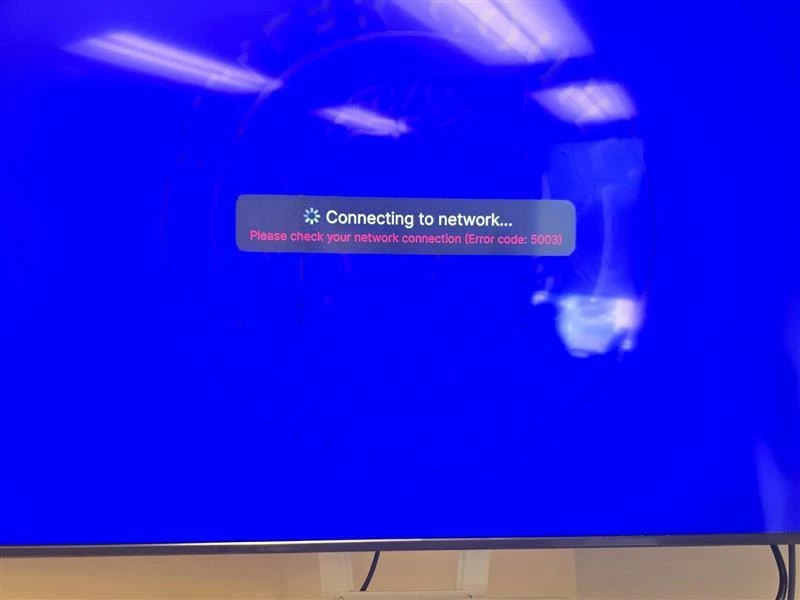
We have Poly Studio devices (a x70 and a x30) that seem to be getting this “Connecting to network” error more and more often now. This seemed to just start happening the past couple weeks, and I figured it was a device firmware problem, so I reverted firmware back to a known working version, but we continue to run into this problem. We have about 35 devices that are on this network and utilizing Zoom Rooms, and at first, we only saw this problem with one, thinking it was a hardware issue. Now that a 2nd one came up, I’m wondering if it’s a problem with the Zoom App version 7.0.2? So far we only have 2 devices out of the 35 doing this, but I was wondering if anyone experienced the same or had any troubleshooting steps to try out. All of our devices are ethernet connected and network traffic allowed outbound. It’s not a consistent problem, so I would not believe it to be network related since other devices are using this same network and not having these errors.
 

2 replies

bstrelko
Community Champion | Customer
April 30, 2026

One of the [few] positive things about the Poly appliances is their unencrypted logs (Neat, Logi, etc will not allow you to view your device logs directly). You should still be able to connect to the appliance web UIs and pull logs while these errors are present (if you can’t - bingo, you’ve got some genuine network issues to address) - from there, you should be able to see if the device is privy to any anomalies that may affect upstream behavior at the time that these errors are showing. 
In my experience, the 5003 errors can stem from a broad set of triggers (we’ve also gone through periods where they are more prominent - the issue tends to mysteriously disappear) and ‘network connection’ issues as reported by Zoom are only the tip of the iceberg that Zoom has access to. For instance, if a Zoom Rooms compute/appliance loses power during a call, Zoom will log it as a network connection failure - yeah… technically true from Zoom’s perspective, as the network connection DID fail, but the error itself is downstream of the actual root cause.

Explorer
May 1, 2026

I can’t lie, I’ve tried looking at the logs for the poly studio systems and there’s so much in there I can’t figure out which log I need to dig in to. We see when this happens the ethernet activity light is completely off on the device, and it’s not pingable on our network (the touchpad is accessible and pingable). I can try using AI to figure out which logs to log into for these devices, but if you’re familiar would you be able to point me in the right direction? 

Here’s the Zoom folder:


bstrelko
Community Champion | Customer
May 1, 2026

No happy-lights on the NIC indicates a ‘true’ network and/or hardware problem. Regardless of whether or not that device can connect to Zoom cloud, it should be sending/receiving packets on your local network.

As for logs, I would absolutely expect to see something that references this.

For Poly appliances, the first place you’re going to want to look is the ‘messages’ logs (view in VScode or another IDE rather than notepad to make your life easier). These logs roll over and increment, so the higher the appended number is, the older the log is. If the issue starts in the middle of the night and you pull logs in the morning, there’s a chance you won’t even have the start-of-incident logged due to all of the noise.
Logs might just get you to the time of when the issue started, rather than the root cause (if the issue is with your network, that might not be captured here, but you’ll know WHEN the issue started and can dig into network logs at around that same timestamp).

Another important thing here - enable ‘Internal Storage Logging’ on the Poly device while working through this issue. This ensures that if the device gets power-cycled (unexpected power loss - and since you can’t reboot via the UI when this is happening, that’s what you’re doing), logs will be cached.

Explorer
May 1, 2026

Thank you so much for all the information and the quick responses! It is looking more like a device issue, but can’t seem to find any consistency yet (this is happening with an x30, and x70, and an x72!) and it’s not happening with all of our devices which is also interesting. 

bstrelko
Community Champion | Customer
May 1, 2026

Yup - pinning down the actual occurrence patterns and root cause is the fun part!