


Yealink A20 old App Version | Community
Skip to main content
-christian
Newcomer
Newcomer
February 7, 2024
Solved

Yealink A20 old App Version

  • February 7, 2024
  • 4 replies
  • 5 views

Hi!

We are running a Yealink A20 Meeting bar with an iPad as controller. The controller is using the latest 5.17 Zoom App from the App Store, the bar ist using a very old 5.13.10.2631 app version. The bar is running the latest firmware from YL, identifying as an "Android 10" device in the Zoom device list. There is no update option in the Zoom device list nor in the bars webinterface.

As the app is very old, it stopped working and atm we got a quite expensive brick with a camera....


Anyone got any ideas on this?
Best answer by ZoomZoom

Hi, guys.


Please contact Zoom support, if you haven't already, but if you do not have a ticket open with Yealink yet, I would strongly recommend doing so too.


The issue here is that Yealink does not have yet a version compatible with the latest minimum version requirements from Zoom.  For the past 15 months, Zoom has been enforcing a minimum version every 3 months, and from the last update on February the 3rd, the minimal current required version is 5.14.5 for ZRs, with the only exception being 5.13.5 for Android controllers.  Source: https://support.zoom.com/hc/en/article?id=zm_kb&sysparm_article=KB0061130 


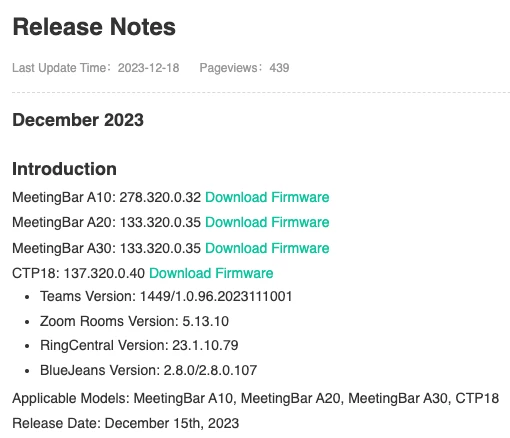
Unfortunately for Yealink A20 devices and other models, the highest version currently available is 5.13.10. From Yealink documentation:

4 replies

Newcomer
February 7, 2024

We are having the same issue. A20 meeting bars in Zoom dashboard shows incorrect firmware and old app version - 5.13.10 (2631). We have a ticket open and have been working with Zoom support, but they have so far been unable to get it sorted. We have factory reset our devices. We also removed one of the A20s from Zoom at supports request, and now that device will not even show up in Zoom dashboards. 

Newcomer
February 10, 2024

I have the same problem. I have one Yealink A20 Meeting bar with one CTP18, few day ago appear a message. But from my account page isn't possible to update app.

ZoomZoomAnswer
Community Champion | Employee
February 13, 2024

Hi, guys.


Please contact Zoom support, if you haven't already, but if you do not have a ticket open with Yealink yet, I would strongly recommend doing so too.


The issue here is that Yealink does not have yet a version compatible with the latest minimum version requirements from Zoom.  For the past 15 months, Zoom has been enforcing a minimum version every 3 months, and from the last update on February the 3rd, the minimal current required version is 5.14.5 for ZRs, with the only exception being 5.13.5 for Android controllers.  Source: https://support.zoom.com/hc/en/article?id=zm_kb&sysparm_article=KB0061130 


Unfortunately for Yealink A20 devices and other models, the highest version currently available is 5.13.10. From Yealink documentation:

-christian
Newcomer
Newcomer
February 14, 2024

Exactly this is the issue.


@PegasusDavidDid the same thing, tried to update via Zoom Center, did manual firmware update, no solution. The thing is, that apart from other vendors like Polycom, Yealink is bundling the Zoom app with their firmware. There is no update possible when there is no new firmware avaliable. On our Polycom device, we can update the Zoom client seperatly, which will not lead to this situation.


@ZoomZoomDid not open a ticket with Zoom, as this is apparently not a Zoom issue. Should I do so nevertheless? I opened a ticket with Yealink, but they are closed for business until the 17.02.2024, as they are celebrating chinese new year...and we are celebrating with bricked devices... 🙎

Community Champion | Employee
February 14, 2024

Hi, Christian.


You are right, and the timing is unfortunate, but I recommend opening also a ticket with Zoom Support because between Yealink and Zoom's support, you will eventually get useful information, an eventual workaround and at the end, a fix. Also, Zoom Support does not close for business.


-christian
Newcomer
Newcomer
February 14, 2024

Did that. Thanks!