

Room controllers can't connect to room PCs with multiple Ethernet interfaces. | Community
Skip to main content
Participant
July 12, 2024
Solved

Room controllers can't connect to room PCs with multiple Ethernet interfaces.

  • July 12, 2024
  • 10 replies
  • 2 views

Starting yesterday, in every room of mine where the room PC has multiple Ethernet interfaces, the room controller iPad can no longer connect to the room PC.

My room PCs mostly have two network interfaces. One standard network with internet access and one local room network to control any display, projectors, etc. The room controller iPads are on the standard network. On the local network the room PC's IP address is 192.168.1.1. It appears as if the Zoom controllers (iPads) are trying to connect to the wrong IP (192.168.1.1) and failing.

Is anyone else seeing this? I've opened a ticket, but the only suggestion was to reboot the iPad.
Best answer by ZoomZoom

@neve is right. Looks like in the latest versions, if a ZR is configured with multiple active network interfaces, it might lead to the wrong IP being used.

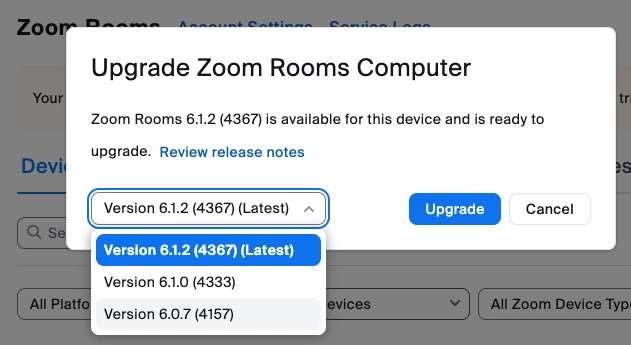
This has start to happen with ZR 6.1.0 and downgrading to ZR 6.0.7 is a valid workaround. Another workaround is to have only 1 network interface active in the in ZR computer.


You can downgrade the current version from the Zoom web portal:

more on this: Upgrading or downgrading Zoom Rooms


10 replies

neveAuthor
Participant
July 15, 2024

In the second part of step 3 (Advanced --> Advanced settings), I am provided a window where I can change the order of the Providers, not the Adapters. See images


neveAuthor
Participant
July 15, 2024

The only thing that works for me is:

  1. Unplug the local room network interface.
  2. Reboot room PC
  3. Plug-in Local network interface
  4. Un-pair and re-pair room controller
  5. never reboot PC again.

This is not an acceptable solution.

neveAuthor
Participant
July 15, 2024

According to Microsoft:

In Windows 10, when you make adjustments to the binding order and save, if you re-open the Adapters and Bindings dialog box you will notice that your changes do not persist. This feature was deprecated in Windows 8 and cut from the Windows 10 product as there are no longer any components that utilize the binding order. Instead, components such as DNS and TCP/IP use the routing and interface metrics to determine which interface would be used.

Newcomer
July 16, 2024

I'm also seeing this in systems where I have a secondary network interface for device control via Room Controls. The Zoom Room is reporting the secondary interface's IP address (192.168.x.y) to the Zoom Cloud instead of the primary interface (enterprise network IP).


Neatpad (connected to enterprise network) which is activated for the room connects to the cloud to pull its configuration but gets told that the Zoom Room is at 192.168.x.y instead of the enterprise network IP address. As mentioned above, the only way to get it functioning is to restart the Zoom Room while the secondary network connection is disconnected. Any power cycling of the Zoom Room after that causes it to fail again.

Newcomer
July 16, 2024

I also attempted switching the connections around so that the "secondary" USB interface connected to the enterprise network and the primary interface connected to the local network. There was no difference, so it seems like it's not related to MAC address or similar aspects of the network connection.

neveAuthor
Participant
July 17, 2024

I've got an open ticket (TS1330214), but the support provided has been slow and unhelpful (reboot iPad, check firewall & ports).

Newcomer
July 19, 2024

I also have an open ticket (TS1338032) which has been passed to engineering along with the Room logs, etc. If I get anything back I'll update here as well.

neveAuthor
Participant
July 19, 2024

I've been told to downgrade to a version prior to 6.1.0. Now I just need a link to a prior version.

neveAuthor
Participant
July 22, 2024

Version 6.0.7 seems to not be affected by this Zoom bug.

ZoomZoomAnswer
Community Champion | Employee
July 23, 2024

@neve is right. Looks like in the latest versions, if a ZR is configured with multiple active network interfaces, it might lead to the wrong IP being used.

This has start to happen with ZR 6.1.0 and downgrading to ZR 6.0.7 is a valid workaround. Another workaround is to have only 1 network interface active in the in ZR computer.


You can downgrade the current version from the Zoom web portal:

more on this: Upgrading or downgrading Zoom Rooms


neveAuthor
Participant
July 23, 2024

I see there is now an option to downgrade the Zoom Room app in the admin interface. Is this new? It would have saved me hours of driving had I known about it.
In many cases the second network interface is for all the AV devices controlled by the Zoom room and not removable.

Community Champion | Employee
July 24, 2024

@neve wrote:

I see there is now an option to downgrade the Zoom Room app in the admin interface. Is this new? It would have saved me hours of driving had I known about it.


I am sorry to say that it is not new.


neveAuthor
Participant
July 24, 2024

I'm very glad it's there as all the downgraded rooms automatically upgraded to 6.1.2. At least it was easier to fix. Automatic upgrading now disabled.