How can I turn off calendar integration? | Community
Skip to main content
Newcomer
January 14, 2022
Solved

How can I turn off calendar integration?

  • January 14, 2022
  • 4 replies
  • 34 views

Can anyone tell me how to turn off calendar integration?

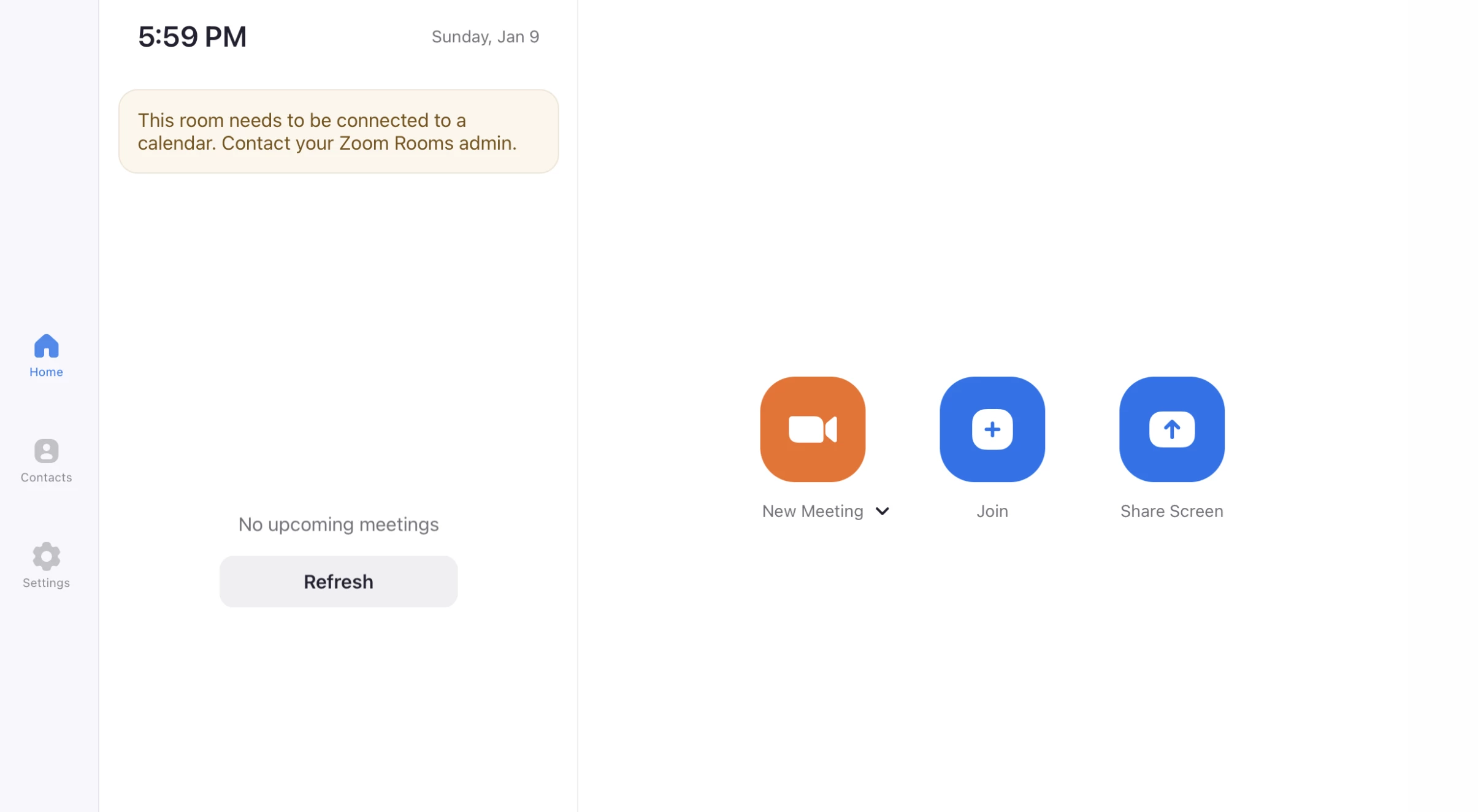
our ZoomRoom works but each tome it starts up on our iPad which controls the Windows computer zoom program, it says, This room needs to be connected to a calendar.”

I don’t believe we need calendar integration.

on line it said all I have to do is go into my account profile and down to calendar and click disable. But disable is not there.

is there another way?

Thank you,

***********

    Best answer by Dan_ZoomSE

    @JFitzsimmons ,


    Are you referring to the message shown in the screen capture below that started appearing after updating your Zoom Rooms to the latest version, 5.9?

    At this time there is no way to make that message go away except to configure calendar integration for that Zoom Room.  There is no option to disable that prompt on the Zoom Room Controller.


    This is a known issue and has been reported to our product and engineering team.


    If this has answered your question, please click the Accept as Solution button below so that others in the Community may benefit as well.

    Thanks!

    4 replies

    Bort
    Employee
    Employee
    January 14, 2022

    Hi @JFitzsimmons 


    For calendar controls of Zoom Rooms, you need to be an admin on the account and go to the Room Management section and select Calendar Integration. There you can adjust issues with calendar integrations or disable them entirely. 

    Newcomer
    January 15, 2022

    Thank you That helps.

    Dan_ZoomSE
    Employee
    Employee
    January 14, 2022

    @JFitzsimmons ,


    Are you referring to the message shown in the screen capture below that started appearing after updating your Zoom Rooms to the latest version, 5.9?

    At this time there is no way to make that message go away except to configure calendar integration for that Zoom Room.  There is no option to disable that prompt on the Zoom Room Controller.


    This is a known issue and has been reported to our product and engineering team.


    If this has answered your question, please click the Accept as Solution button below so that others in the Community may benefit as well.

    Thanks!

    Newcomer
    January 15, 2022

    Yes that's it. Thank you.

    Newcomer
    June 11, 2024

    I think I'm having a similar problem to the originator of this thread but I haven't worked out how to stop the screen blocking my use of Zoom which says "You can connect to Zoom calendar and one...". I went to the Room Management section or Settings and selected Calendar Integration and found no buttons to click or adjust. Please advise. Thanks!

    Newcomer
    June 19, 2024

    Unfortunately, this is a joke. I linked a calendar on my iPhone. So I now get the attached screenshot on the iPhone when I go to Calendar tab. But when I go to Room Management, Calendar Integration, it says "No calendar services are connected." Why cannot I remove the calendar on the iPhone?


    And how do I attach that screen shot??