Help for Disable video | Community
Skip to main content
New Member
June 14, 2026
Solved

Help for Disable video

  • June 14, 2026
  • 2 replies
  • 52 views
Hi everyone! Is it possible to disable the participants' cameras when creating the meeting?

 
    Best answer by ExpertswhoJohn

    hi ​@Thaís De Menezes ,

    Zoom would call that a webinar, but you can simulate it in Zoom

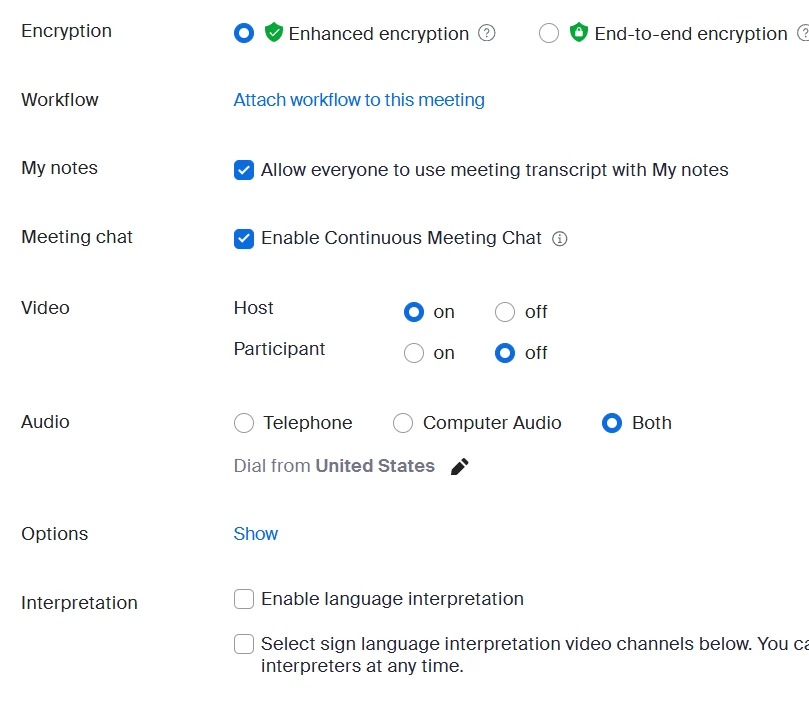
    WHen you setup the meeting. You can turn them off by default.


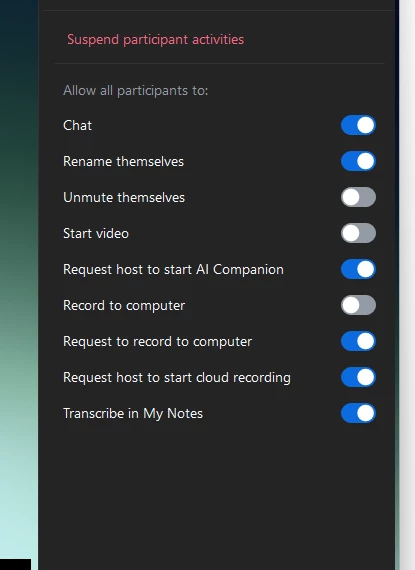
    Then, once in the meeting you can stop them from turning on their cameras from the host - participants options


    All the best


    John Drinkwater

    Zoom Community Super Champion

    I am not a Zoom Employee


    https://www.youtube.com/@boomwithlordzoom


    2 replies

    ExpertswhoJohn
    Community Super Champion | Customer
    Community Super Champion | Customer
    June 15, 2026

    hi ​@Thaís De Menezes ,

    Zoom would call that a webinar, but you can simulate it in Zoom

    WHen you setup the meeting. You can turn them off by default.


    Then, once in the meeting you can stop them from turning on their cameras from the host - participants options


    All the best


    John Drinkwater

    Zoom Community Super Champion

    I am not a Zoom Employee


    https://www.youtube.com/@boomwithlordzoom


    ElephantInTheZoom
    Explorer
    Explorer
    June 15, 2026

    @ExpertswhoJohn to the rescue! 😊 ​@Thaís De Menezes, just adding that you can find these settings when through the online portal (not the app). ​@ExpertswhoJohn’s right - this sounds more like a webinar than a meeting - but if you already have it scheduled you can change the settings before the meeting like ​@ExpertswhoJohn shows. Check out these settings (outlined in red) specifically: