

Disable waiting room after meeting starts? | Community
Skip to main content
Newcomer
August 18, 2021
Question

Disable waiting room after meeting starts?

  • August 18, 2021
  • 2 replies
  • 6 views

Hello,

I used to be able to disable the waiting room after the start of a meeting, but that option is greyed out for me now. I've read through posts and instructions, but it just keeps sending me back to either enabling or disabling in settings before meetings start.
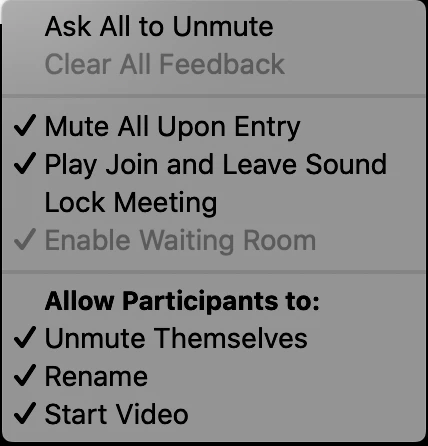
 

Ideally, I let the first person in, and then disable the waiting room so others just pop in as they arrive. Can't figure out what's changed to stop that from being an option.

I'd appreciate any advice.

Thanks

    2 replies

    shahbaz63
    Newcomer
    Newcomer
    August 18, 2021

    Waiting Room options

    Note: If the Waiting Room has been previously customized at the user level then disabled after, when Waiting Room is enabled in a meeting's settings, the meeting will use the user-level setting until it has been reset, or the account setting has been locked

    More details here : https://support.zoom.us/hc/en-us/articles/115000332726-Waiting-Room 

    Newcomer
    June 14, 2023

    I am having the same issue.  I went in and "reset" beside the Waiting Room toggle in settings - but the issue continues.  I think it has to do with several issues I had yesterday trying to Live Stream our meeting on Facebook.  I discovered that I am the OWNER of the account (I set it up & I pay for it), but I'm not the ADMIN.  My husband went in and added himself and was able to change himself to the ADMIN (strange how that is allowed - but I cannot update to be the ADMIN) - then several toggles were turned off and on in the process trying to set up to Stream Live on FB.  

    All those issues persists right now as well - I still am not the ADMIN nor can I update to be that  - the "Enable Waiting Room" is check marked and grayed out and cannot be unchecked once the meeting starts - AND I cannot stream to FB. 

    Any help?

    Newcomer
    June 14, 2023

    Also strange is that when I navigated to this Zoom Community Page from a link given to me from the robot chat from the home page of *********** log in ~ my HUSBAND's name showed up as the sender of that last message (BJGURLEY).  How did that happen?