Can I see the peak of how many people were on my Zoom meeting? | Community
Skip to main content
Newcomer
November 4, 2024
Solved

Can I see the peak of how many people were on my Zoom meeting?

  • November 4, 2024
  • 1 reply
  • 0 views

I've searched a lot, but didn't find anything, so does someone know if I can see the peak of how many people were on my Zoom meeting?

Best answer by bstrelko

Sure you can.


You will need admin access on your Zoom tenant.


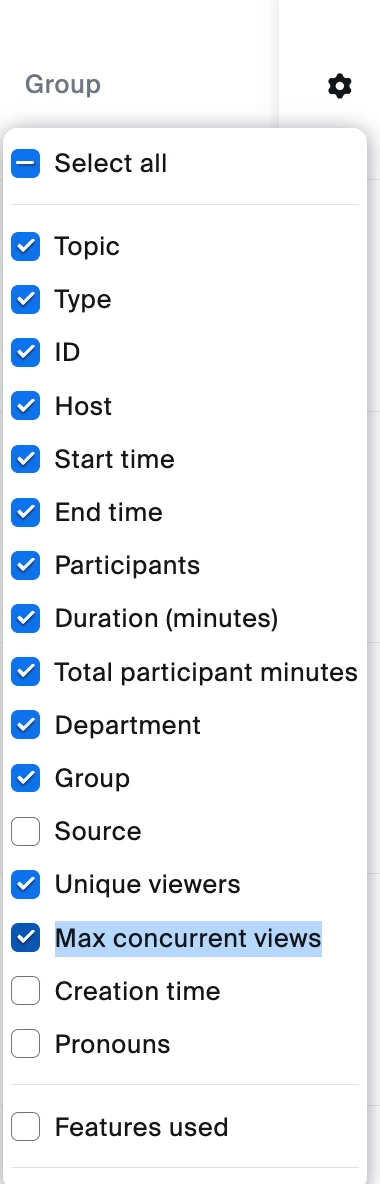
Login to your account at zoom.com, then navigate to Account Management -> Reports -> Meeting & Webinar History. Find the meeting in question and then hit the small settings cog near the right header of the screen - you should have the option to enable the "Max Concurrent Views" field (sounds like this will be what you're looking for) if it's not enabled already.


1 reply

bstrelko
Community Champion | Customer
bstrelkoAnswer
Community Champion | Customer
November 24, 2024

Sure you can.


You will need admin access on your Zoom tenant.


Login to your account at zoom.com, then navigate to Account Management -> Reports -> Meeting & Webinar History. Find the meeting in question and then hit the small settings cog near the right header of the screen - you should have the option to enable the "Max Concurrent Views" field (sounds like this will be what you're looking for) if it's not enabled already.