Hi, @Arushi66,
The short answer is that Breakout Rooms have to be reassigned for each meeting.
However, there is a way to potentially accommodate your need, referred to as "Preassigning Participants to Breakout Rooms". While its main purpose is the pre-assigning of attendees, it can also be used to simply create the list of Breakout Rooms to upload, each room with a single "dummy" email address in it.
See this Zoom Support article for detailed information on uploading Breakout Room information:
https://support.zoom.us/hc/en-us/articles/360032752671-Pre-assigning-Participants-to-Breakout-Rooms
Review the Support article for how to do this for recurring meetings; you can't just assign it to one occurrence, it has to be applied to each occurrence. Also carefully note the prerequisites and settings required.
Here's an example of how you might fill out the CSV file before uploading it:
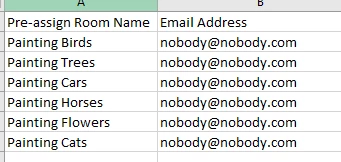
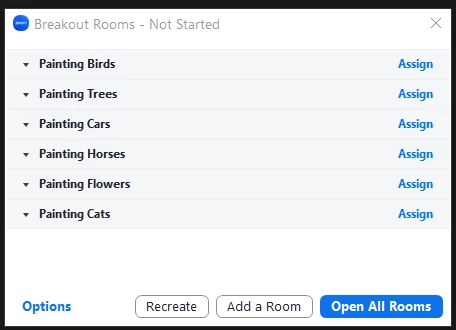
I use that "fake" email address and it never causes an issue. No email is sent by Zoom for this pre-assignment, it's just used to match up attendees with rooms when the Breakout Rooms are opened. When you click on the Breakout Rooms prior to starting them, you'll see this:
Hopefully this will ease your administrative burden in setting up your meetings!


