Voice message | Community
Skip to main content
Newcomer
July 17, 2024
Solved

Voice message

  • July 17, 2024
  • 3 replies
  • 8 views

Hi there,


Does anyone know how to record their own personal message in Zoom? I found where I can select an automated person to say that no one is available to answer your call. But any way to record my own for a personal touch?

Best answer by colegs

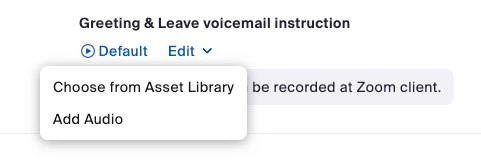
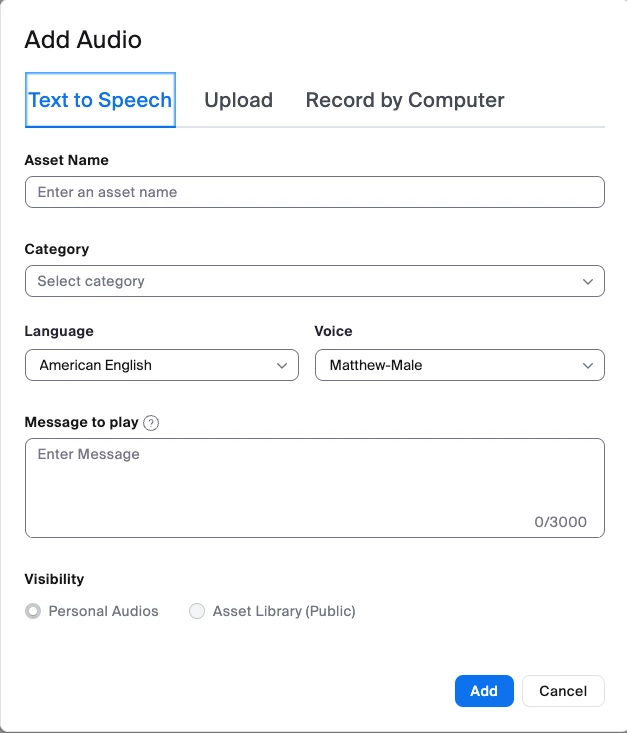
@Rob-007 - If you go into your phone settings, under the closed hours section their is an option for what to do for your greeting and voicemails.  You can choose a prerecorded message from the account's asset library, or chose to add a new message, which you can either record our upload yourself.


3 replies

colegsAnswer
Community Champion | Employee
July 17, 2024

@Rob-007 - If you go into your phone settings, under the closed hours section their is an option for what to do for your greeting and voicemails.  You can choose a prerecorded message from the account's asset library, or chose to add a new message, which you can either record our upload yourself.


Rob-007Author
Newcomer
July 17, 2024

Ok thank you Colegs, that's perfect! I'm going on vacation so I was looking for a personal touch that will do it! Thanks again so much!

Newcomer
August 1, 2024

you can record your own personal message in Zoom. Here’s how:

  1. Log in to Zoom and go to your Settings.
  2. Navigate to Phone and then Call Handling.
  3. Choose Voicemail Greeting and select Record a Greeting.
  4. Follow the prompts to record and save your personal message.