Voice mail | Community
Skip to main content
Newcomer
June 21, 2023
Solved

Voice mail

  • June 21, 2023
  • 1 reply
  • 22 views

I dont have a phone number but i have 2 numbers for my employees. My question is how to set up voice mail for the user phone number. for ex by default i got an extension 800 (  owner) and when i go to phone settings under my extension is that like a generic voice mail for all the phone numbers or is there a separate voice mail for each user?

 

Best answer by Eliot

hi ramaswap,


to set up vm for your staff, please go to:


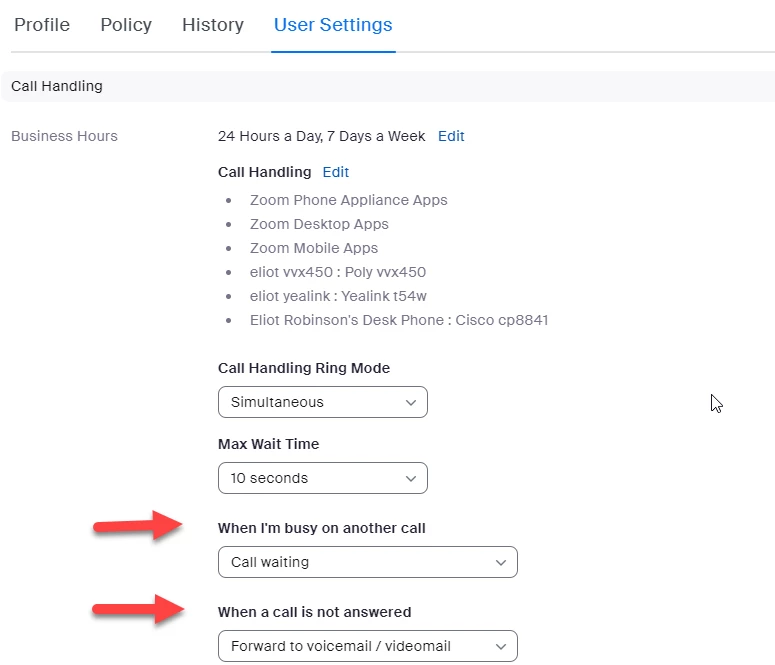
Admin->Phone System Management->Users & Rooms->select user extension 802 (and 806)->User Settings


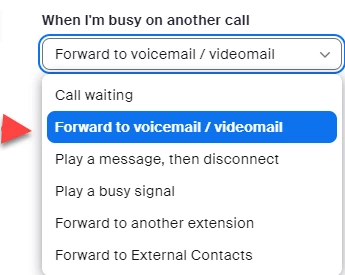
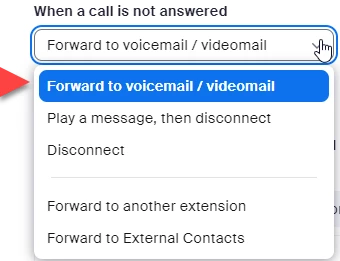
You have drop down options for “When I’m busy on another call” and “When a call is not answered”.  One of the options is to send the call to voice mail.


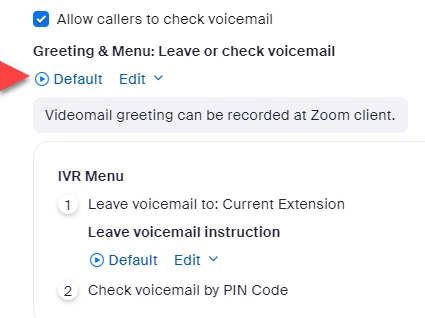
Next you can use the default message or create your own message.


You can click the play button to listen to the default message.  If you want to change it, click edit.


please let me know if this works for you and if you have any other questions.


Thanks,  eliot


1 reply

Community Super Champion | Partner
June 21, 2023

hi ramaswap,


you may want to start with a basic zoom phone course.

(61) Initial Zoom Phone Setup for Administrators - YouTube


to answer your voice mail question, each user will have a separate voice mail box and can have a personal customized greeting.

Customizing audio greetings and hold music – Zoom Support


each user that makes or receives outside calls will need a paid calling plan.  extension to extension calls are free and do not require a calling plan.

Plans & Pricing for Zoom Phone | Zoom


this support article describes how to get and use phone numbers.  one local telephone number comes with each calling plan.  additional phone numbers are currently usd 5.00 per month.  you may want to add one phone number for yourself so that people can call you directly.  in united states, zoom will port your existing telephone numbers to zoom for free.

Plans & Pricing for Zoom Phone | Zoom

Managing phone numbers – Zoom Support


zoom phone has more advanced setup features that are free to use.  in particular, many companies have a auto receptionist that answers calls and routes the calls with an interactive voice response (ivr) system, i.e. for sales - press one, for support - press two, for billing - press three.

Managing auto receptionists – Zoom Support


many businesses use call queues for each major area such as sales, support and billing.  users can be assigned one or call queues to answer incoming calls.  these call queues are free and easy to set up.

Managing call queues – Zoom Support


one approach is to start with the easiest setup, i.e. each user has an extension, a local telephone number, a calling plan and a voice mail box.  zoom phone has lots of great features for free that you can add on as required.


thanks,  eliot

ramaswapAuthor
Newcomer
June 24, 2023

There may be a way you are describing, call handling is available of the owner account and its not availbale for the other phone users or numbers. 

800 extension --owner no phone number 

802 and 806 user extensions have phone numbers assigned to them. So i want to set up a voice mail to these users when a call goes unattended. is there a way we can do this. I was thinking each user number should have a voice mail set up and i am not finding it.

Support took 3 days to answer that question and yet to hear from them. If it takes this long for support then .............

EliotAnswer
Community Super Champion | Partner
June 24, 2023

hi ramaswap,


to set up vm for your staff, please go to:


Admin->Phone System Management->Users & Rooms->select user extension 802 (and 806)->User Settings


You have drop down options for “When I’m busy on another call” and “When a call is not answered”.  One of the options is to send the call to voice mail.


Next you can use the default message or create your own message.


You can click the play button to listen to the default message.  If you want to change it, click edit.


please let me know if this works for you and if you have any other questions.


Thanks,  eliot