
Video calls on 2N IP intercoms | Community
Skip to main content
LucaPaleari
Newcomer
Newcomer
July 15, 2025
Solved

Video calls on 2N IP intercoms

  • July 15, 2025
  • 3 replies
  • 5 views

Hello.


I'm trying to setup the video intercom feature described in this official KB: 73974.

The environment is:

2N IP Verso 2.0 - firmware 2.46.1.70.4

Yealink T58W - firmare 150.86.30.10


Both of them are autoprovisioned.

I'm unable to find the "video intercom toggle" to enable, as referred in the KB, under the policy tab of the device.


Has anyone beed able to sort it out?


Thanks a lot

LP

Best answer by sparrow

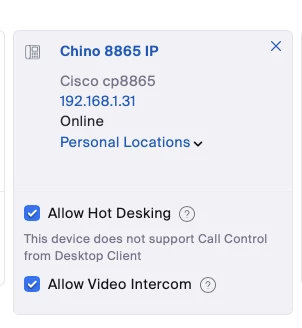
I don't believe that is on by default, and I recall having to contact Zoom to have it enabled. Open a ticket with Zoom to have it enabled on your account. Once enabled, you will see video intercom as mine does for my Cisco 8865 below. 


3 replies

sparrow
Community Super Champion | Customer
sparrowAnswer
Community Super Champion | Customer
July 15, 2025

I don't believe that is on by default, and I recall having to contact Zoom to have it enabled. Open a ticket with Zoom to have it enabled on your account. Once enabled, you will see video intercom as mine does for my Cisco 8865 below. 


LucaPaleari
Newcomer
Newcomer
July 15, 2025

This was my feeling as well.

Ticket already opened.


I'll keep you posted.


Thanks a lot

Newcomer
July 18, 2025

I had a similar issue and can confirm I had to reach out to Zoom support for them to enable the video intercom option on our account. Good stuff Sparrow!

MGSR
Community Manager
Community Manager
July 18, 2025

Welcome to the Zoom Community, @JordanB! Thank you for confirming @sparrow's advice worked for you. I'll mark his answer as a solution for other users that might experience the same concern.

LucaPaleari
Newcomer
Newcomer
July 18, 2025

Confimed!

WE re UP&Running with the video intercom now.


Many thanks


Luca