

Team member assigned Zoom Voice doesn't see the "Phone" icon in Zoom Workspace app | Community
Skip to main content
New Member
March 6, 2026
Question

Team member assigned Zoom Voice doesn't see the "Phone" icon in Zoom Workspace app

  • March 6, 2026
  • 1 reply
  • 7 views

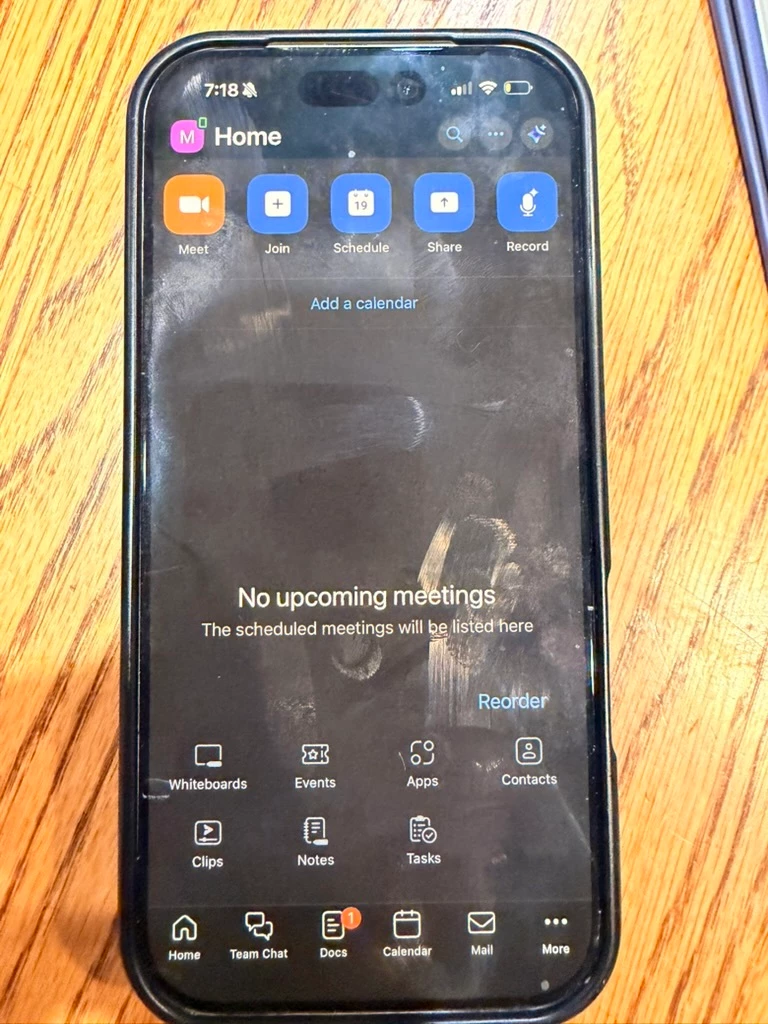
I have a Zoom phone license assigned to a user and they don’t see the Zoom phone icon in the Zoom Workspace app on ios.  I’ve made sure the setup process is complete on my end and it says it’s ready to go.


Not sure why it’s not working.  Here’s a picture of their phone:
 

    1 reply

    MGSR
    Community Manager
    Community Manager
    March 6, 2026

    Hello ​@ClickFun Events Co,

    Welcome to the Zoom Community! We’re glad to have you here!
     

    If the Zoom Phone icon isn't showing in the Zoom Workplace app on iOS after assigning a license, try customizing the icon display order:

    1. In the app, tap Reorder.
    2. Drag and drop icons between the More menu and the navigation bar.
    3. Tap Done when finished.

    This should help make the Zoom Phone icon visible if it's hidden in the More section.

    New Member
    March 6, 2026

    I figured it out.  I had to “activate” the license.  This is a completely separate step from the assigning and set up process.  I would have never known I needed to activate the license without calling Zoom, and I would have had to cancel.