SIP Phones - Caller ID updates when connected?
We have Yealink T54W for our users that require a physical desk phone. I have added contacts to the Yealink's local directory and remote phonebook.
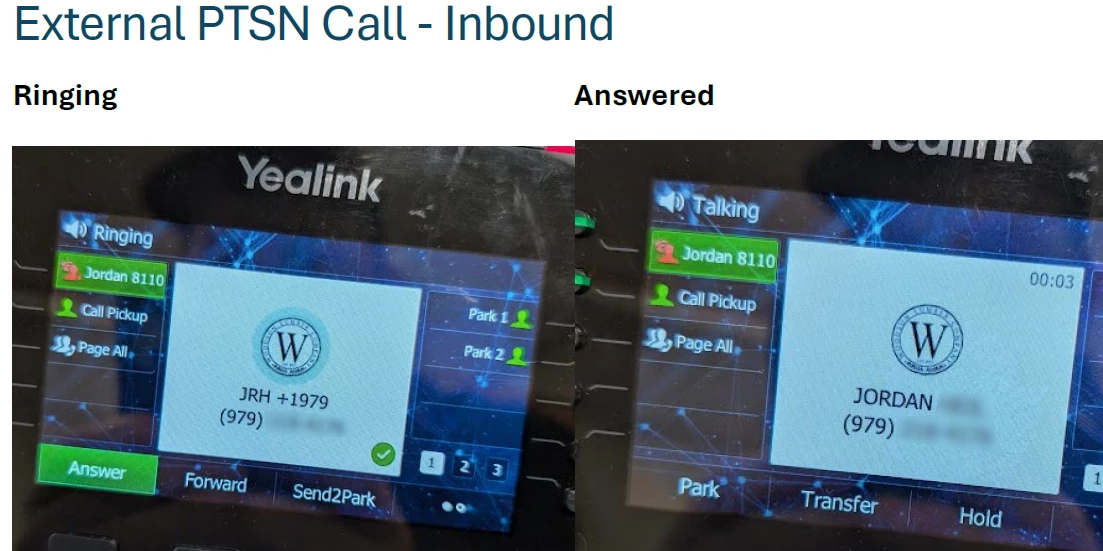
When a call is connected, I've noticed the caller ID name change from what I have set in the local directory or remote phonebook. Is Zoom performing a SIP update when a call is connected? I'm assuming whatever is happening causes at least the caller name to change. In the provided example, the caller name was being reverted to how my cell phone carrier displays my name. The avatar/logo from what I set in the local directory remained too, which seems odd, as I would think it would 1) drop the entire local directory contact that was matched or 2) not allow a local contact name to be changed if matched.
In my testing, it seems to occur mainly for inbound calls. Outbound calls seem to stick better.