

Recording in-coming call custom notification | Community
Skip to main content
Newcomer
November 5, 2024
Solved

Recording in-coming call custom notification

  • November 5, 2024
  • 1 reply
  • 0 views

The current notification says "The call is being recorded, if you do not wish to be recorded please hang up now". 

I've created a custom audio file in the asset library notifying the caller the call is being recorded.


How do I get that custom response to play at the beginning of a in-coming call vs. the zoom notification?

Best answer by Eliot

hi mbfull,


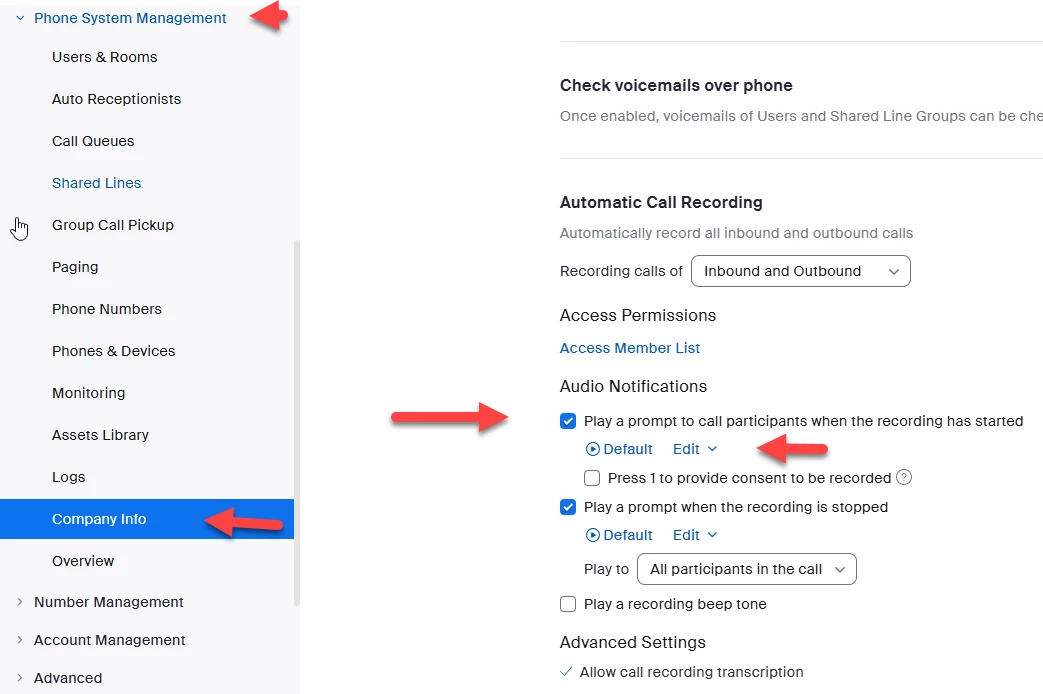
you can select edit and upload and choose what audio file you want to use.


admin->phone system management->company info->policy->automatic call recording

see screen shot below.


Did my response answer your question? If so, please don't forget to mark the reply as an accepted solution.


thanks,  eliot

1 reply

EliotAnswer
Community Super Champion | Partner
November 5, 2024

hi mbfull,


you can select edit and upload and choose what audio file you want to use.


admin->phone system management->company info->policy->automatic call recording

see screen shot below.


Did my response answer your question? If so, please don't forget to mark the reply as an accepted solution.


thanks,  eliot

mbfullAuthor
Newcomer
November 5, 2024

Thank you this was helpful - updating the path to automatic call recording 

Account Management > Account Settings > Zoom Phone