PORT MY SKYPE NUMBER | Community
Skip to main content
Newcomer
April 16, 2025
Solved

PORT MY SKYPE NUMBER

  • April 16, 2025
  • 1 reply
  • 2 views

Hello,

We’ve just signed up for the Zoom Business Phone plan and completed the number porting process from Skype. However, when we try to make a call through Zoom, we get the following message:
“Sorry, the requested service is not available in your calling plan.”
We subscribed to a business phone plan, so we’re not sure why it’s not working.

Additionally, during the porting process, an #800 extension was added to our number — we didn’t request this and would like to have it removed.

Could you please help us resolve these issues?

Thank you!

Best answer by Eliot

hi @HausPrime 


you probably assigned your telephone number to your auto receptionist and 800 is your assigned extension.  this is a common error and easy to make.


if you want your telephone number assigned to yourself, please open a support ticket to reassign the telephone number from the auto receptionist to your user extension.  in addition, assign your calling plan such as unlimited us/canada to yourself.


alternatively, you can change the auto receptionist to automatically forward incoming calls to your extension and assign your calling plan to yourself. 


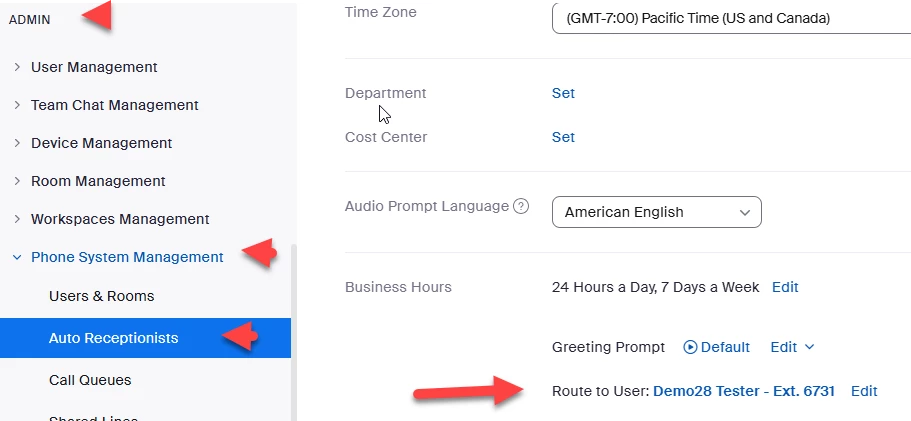
sign in to the zoom portal and go to admin ->phone system management->auto receptionists->business hours->route to user and select your user name or extension.  My screen shot shows demo28 tester but you will use your user name.


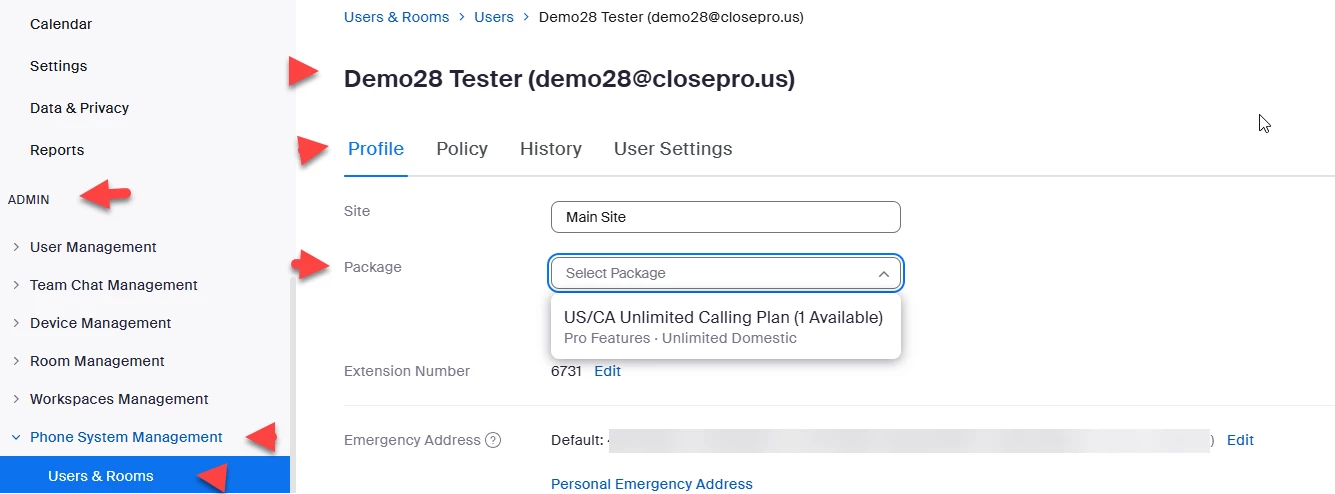
next, assign a zoom phone calling package to yourself.


Did my response answer your question? If so, please don't forget to mark the reply as an accepted solution.


thanks,  eliot


1 reply

EliotAnswer
Community Super Champion | Partner
April 16, 2025

hi @HausPrime 


you probably assigned your telephone number to your auto receptionist and 800 is your assigned extension.  this is a common error and easy to make.


if you want your telephone number assigned to yourself, please open a support ticket to reassign the telephone number from the auto receptionist to your user extension.  in addition, assign your calling plan such as unlimited us/canada to yourself.


alternatively, you can change the auto receptionist to automatically forward incoming calls to your extension and assign your calling plan to yourself. 


sign in to the zoom portal and go to admin ->phone system management->auto receptionists->business hours->route to user and select your user name or extension.  My screen shot shows demo28 tester but you will use your user name.


next, assign a zoom phone calling package to yourself.


Did my response answer your question? If so, please don't forget to mark the reply as an accepted solution.


thanks,  eliot