Phone setup and IVR | Community
Skip to main content
Newcomer
May 27, 2023
Solved

Phone setup and IVR

  • May 27, 2023
  • 4 replies
  • 3 views

I'm getting nowhere with customer service. I am a small business owner with one line, just for me. I am still not receiving calls on my phone. When I try to call from another phone number, it goes to an operator and asks for a extension. How can I set this up so that one, the app on my phone actually rings, and two, it goes straight to the voicemail, no operator-no extension. Can anyone help? 

Best answer by Eliot

hi sgcpllc,


Two possible ways to go:

  1. Have auto receptionist automatically ring your phone.
  2. Reassign your one number from auto receptionist to your phone.

First approach,

On the Zoom portal,

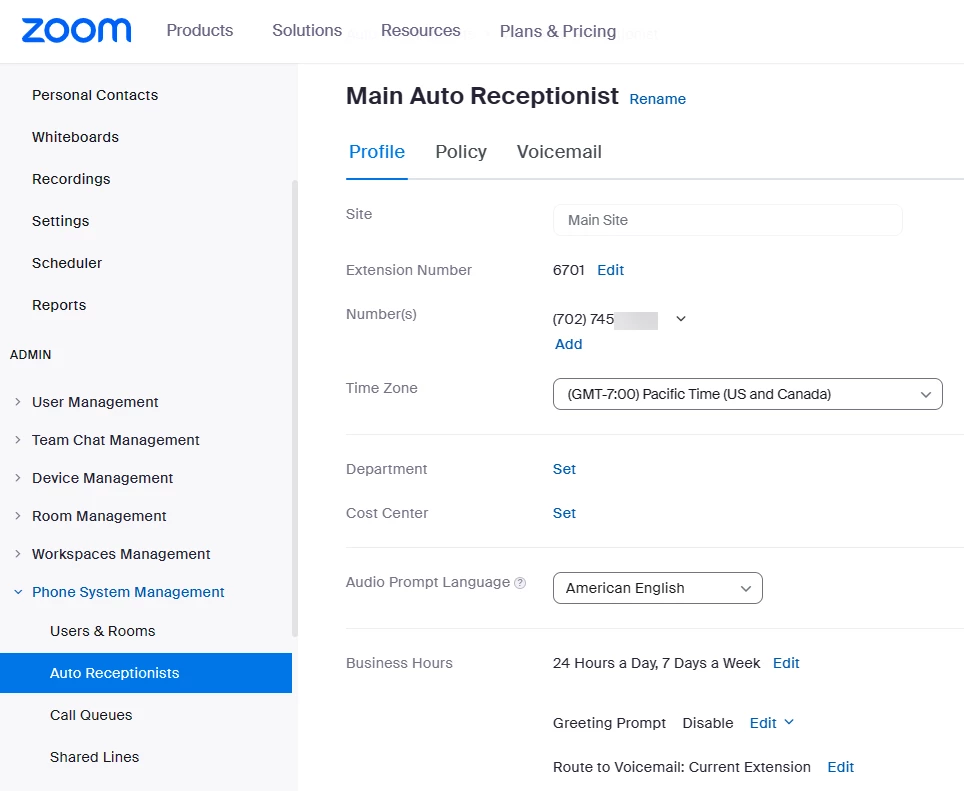
ADMIN->PHONE SYSTEM MANAGEMENT->AUTO RECEPTIONISTS->Main Auto Receptionist->Profile


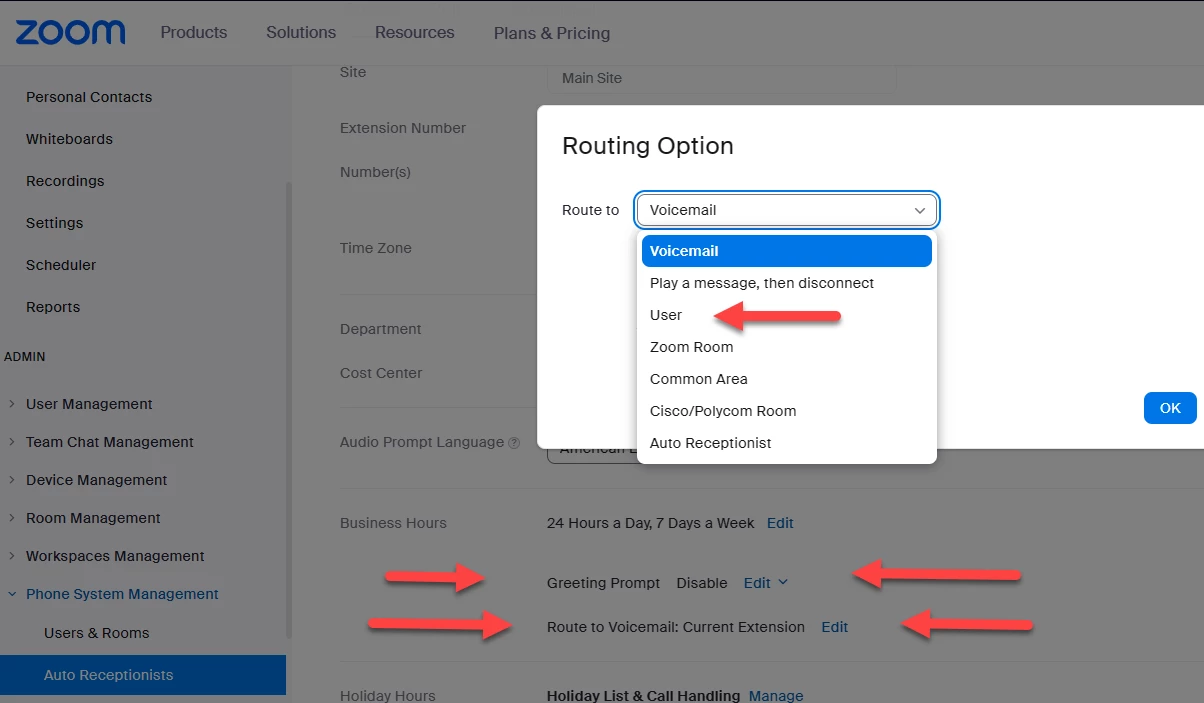
Scroll down to Business Hours – Should display 24 Hours a Day, 7 Days a Week.  If not use Edit.

Greeting Prompt – Should display Disable.  If not use Edit to change to Disable.

Route to – Use Edit to select Route to User


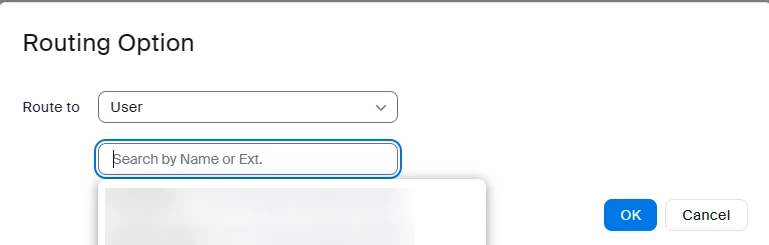
Click in the Search by Name or Ext. box and select yourself as the user to route calls to.  Click OK.


If this is not what you want, I will be happy to go over second option.


Thanks, eliot

4 replies

Ray_Harwood
Community Super Champion | Customer
May 27, 2023

Welcome to the Zoom Community, @SGCPLLC.


Just to clarify... you want your phone to ring, and if not answered go straight to voice mail.


Please check the Call Handling -> Business Hours section of your Personal -> Phone menu:

When a call is not answered should be set to Forward to voicemail / videomail.


This assumes that you have assigned a phone number to yourself.  If you're trying to do this with the "Company Phone," let me know... this isn't recommended, but if you really only have one phone number and want that to be your personal phone number, I'll try to recall how this is done and let you know:

Personally, I recommend paying the extra $5/month for an additional phone number... and making one number or the other the "company number" and set up an IVR for it.  Put THIS number into places where you're not really expecting people to be able to reach you directly, as if you have a front desk person handling your calls.  This helps weed out spam calls who go to the auto-attendant first and get lost in the IVR... then only give your phone number to "real people".


Just my opinion!

EliotAnswer
Community Super Champion | Partner
May 28, 2023

hi sgcpllc,


Two possible ways to go:

  1. Have auto receptionist automatically ring your phone.
  2. Reassign your one number from auto receptionist to your phone.

First approach,

On the Zoom portal,

ADMIN->PHONE SYSTEM MANAGEMENT->AUTO RECEPTIONISTS->Main Auto Receptionist->Profile


Scroll down to Business Hours – Should display 24 Hours a Day, 7 Days a Week.  If not use Edit.

Greeting Prompt – Should display Disable.  If not use Edit to change to Disable.

Route to – Use Edit to select Route to User


Click in the Search by Name or Ext. box and select yourself as the user to route calls to.  Click OK.


If this is not what you want, I will be happy to go over second option.


Thanks, eliot

Newcomer
May 28, 2023

I had this same issue initially, and finally found this setting. I removed the "greeting" on the Auto attendant and my line, just in case.


Then, I saved the voicemail greetings under the user for not available.

Community Super Champion | Partner
May 29, 2023

hi ryang,

perfect!

thanks,  eliot

SGCPLLCAuthor
Newcomer
May 28, 2023

Ah, thank you so much. I believe this fixed the issue. 

Bri
Community Manager
Community Manager
May 31, 2023

Thanks for the update @SGCPLLC ! Please don't forget to click "Accept as Solution" 🙂

Newcomer
March 16, 2025

Yes Zoom customer service is non-existent, I've been trying to set up my phone so it dials out for days using the global unlimited (which should be renamed global very limited) every time I try to dial a number I get "sorry we cannot complete your call your service plan does not include calling this destination (this was a local call) did you find an alternative to zoom?