Phone BLF key on zoom workplace | Community
Skip to main content
Newcomer
November 24, 2025
Solved

Phone BLF key on zoom workplace

  • November 24, 2025
  • 1 reply
  • 8 views

Hi,

We have BLF keys on our Poly phones but they are not showing up on the workplace windows or phone app. We are only able to see the parked lines. How do we display the blf keys so users can call each other and see their line status.

Best answer by Eliot

hi @zoom908 


BLF is only for desk phones.


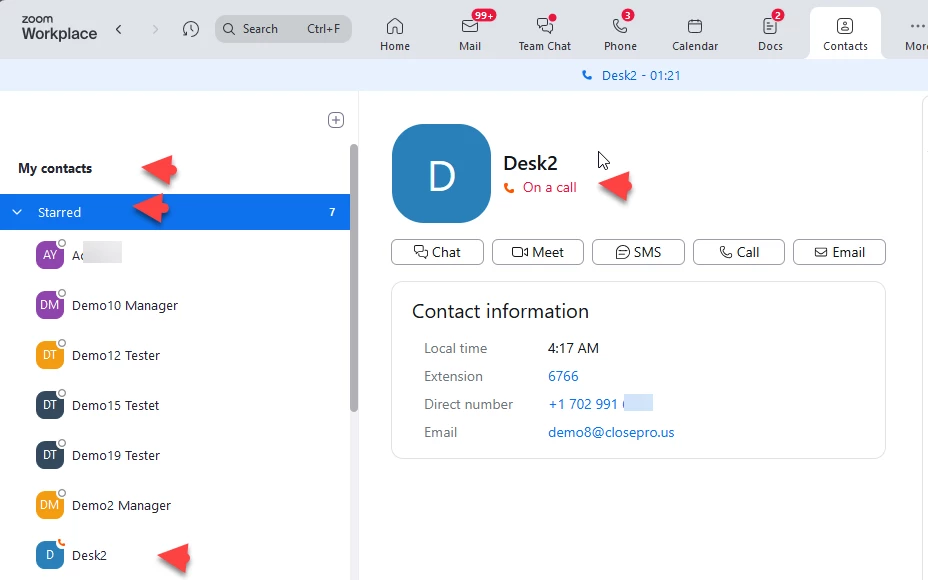
the closest equivalent to BLF is Zoom presence which tracks the presence of users accross Zoom services.  You can see user presence on Zoom Workplace contacts.  You can look at company contacts for all Zoom users on your account and star contacts you want to monitor presence for.  The starred contact appear at the top of the contacts.  You can click a contact to dial the contact.  This screen print shows user Desk 2 is on a call.


Setting your presence status


Did my response answer your question? If so, please don't forget to mark the reply as an accepted solution.


thanks,  eliot

 

1 reply

EliotAnswer
Community Super Champion | Partner
November 27, 2025

hi @zoom908 


BLF is only for desk phones.


the closest equivalent to BLF is Zoom presence which tracks the presence of users accross Zoom services.  You can see user presence on Zoom Workplace contacts.  You can look at company contacts for all Zoom users on your account and star contacts you want to monitor presence for.  The starred contact appear at the top of the contacts.  You can click a contact to dial the contact.  This screen print shows user Desk 2 is on a call.


Setting your presence status


Did my response answer your question? If so, please don't forget to mark the reply as an accepted solution.


thanks,  eliot

