

Not seeing SMS Campaigns tab under Advanced | Community
Skip to main content
Explorer
March 22, 2023
Solved

Not seeing SMS Campaigns tab under Advanced

  • March 22, 2023
  • 7 replies
  • 22 views

Hi, I'm following the instructions in "SMS/MMS 10DLC Compliance for Zoom Phone and Zoom Contact Center" (https://support.zoom.us/hc/en-us/articles/5016496738445) and don't see this tab under Advanced on our admin page.


Instructions:

 

Menu:
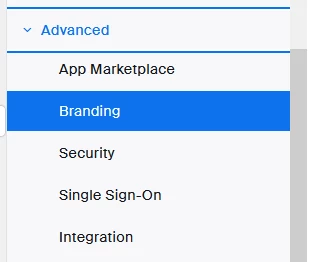
 

Am I in the right place? Is there something that needs to be done to enable it? Thanks!


Todd
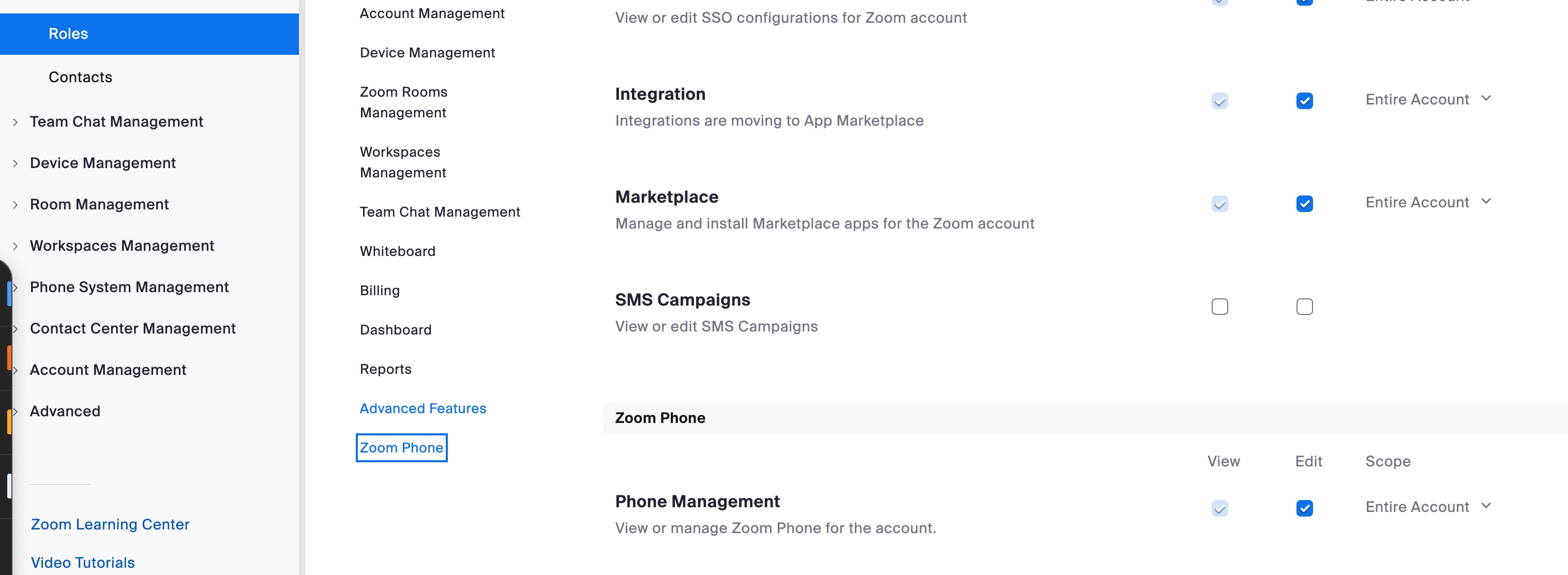
Best answer by sachinzoom

Hello @tfiske 


If you are an admin ( not the owner of the account ), Please go to User Management -> Roles ->All ->  Admin -> Advanced Features and ensure you have SMS campaigns checked.  This will enable you to see the SMS campaigns.


If this response helps, please accept the answer as an accepted solution, so others can benefit as well.

7 replies

Community Champion | Employee
March 22, 2023

Hello @tfiske 


If you are an admin ( not the owner of the account ), Please go to User Management -> Roles ->All ->  Admin -> Advanced Features and ensure you have SMS campaigns checked.  This will enable you to see the SMS campaigns.


If this response helps, please accept the answer as an accepted solution, so others can benefit as well.

Newcomer
September 14, 2023

This did not work for me. I am an admin on our account and can't see any of these settings.

tfiskeAuthor
Explorer
March 22, 2023

Thanks @sachinzoom, I don't see the Roles option either. I guess I will have to have my manager help with this tomorrow. He is the account owner, and not available today.

Community Champion | Employee
March 22, 2023

@tfiske 


Your manager ( account owner ) can also grant you Role Management access for your admin role via same path I mentioned above.  Glad your requirement is addressed.


If this response helps, please accept the answer as an accepted solution, so others can benefit as well.

Community Manager
September 14, 2023

@jennabeck93 just tagging you in @sachinzoom's reply here. Even though you are an Admin on the Account, the Admin will still have limited access to areas with your role.


The account's owner must grant you role management access; the owner can either change the admin role settings for all users with the role 'Admin' or create a new role and rename it (e.g. Admin Role w/ Role Management) and assign you that role, granting you role management access. I hope this helps!


tfiskeAuthor
Explorer
March 29, 2023

Hi @sachinzoom , took me a while to get back to this, but that worked and we got our campaign created. We are a social service and are not going to be using text messages for any sort of campaign, but I guess we have to play somebody else's game anyway! 😃  Thanks for your help!

Community Champion | Employee
April 14, 2023

Hi @tfiske 


Glad to hear

Newcomer
May 9, 2025

I have a Pro Account. Can I send SMS messages? I don't see the options that you're displaying.

Newcomer
March 14, 2025

I am the zoom account owner, but am still not seeing the SMS Campaigns Option under Advanced. I did just enable SMS today. Is there a lag for menus to update?

Newcomer
May 7, 2025

I am wondering the same thing.  I enabked SMS today but still no SMS Campaign under Advanced.  Did it eventually show up for you? 

Newcomer
May 9, 2025

Somehow I ended up migrating here and I was able to access the SMS Campaign

https://zoom.us/cpw/page/smsCampaign#/sms-campaigns/list?pageNumber=1&pageSize=1

Newcomer
June 16, 2025

This is found under Number Management now.

Newcomer
June 16, 2025

SMS Campaigns is under Number Management for me, not the Advanced menu.