Limiting phone recording access | Community
Skip to main content
Newcomer
June 4, 2025
Solved

Limiting phone recording access

  • June 4, 2025
  • 3 replies
  • 0 views

Is it possible to limit recording access for specific users/departments/sites.  I'll explain a bit further as I know I can create roles, but here is a scenario:


User A at Site A has all their calls recording for auditing purposes. Someone who can can review the calls for Site A sees the calls from User A as expected.


User B works at Site B in HR, and by default does not have their calls recorded.  When User A calls User B the call is still recorded because we record user A's calls.  Is there a way to prevent the auditor for Site A from listening to that call.  


We use to use DVS Analytics that allowed us to provide some logic to that calls were excluded.

Best answer by Eliot

hi @bryants 


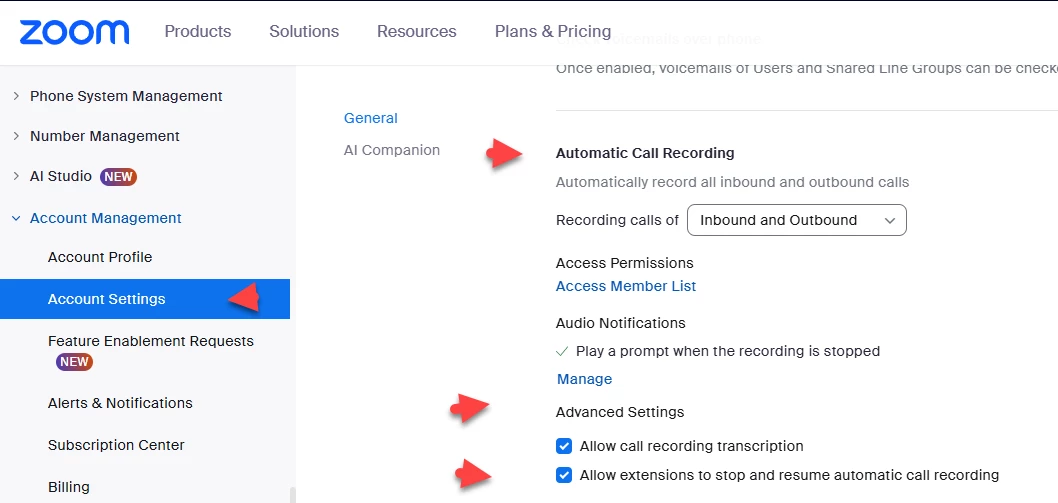
Users with automatic call recording enabled on their phone line should not use their phone for confidential HR matters.  A better approach would be to use their personal cell phone.  That said, Zoom has an advanced option in zoom phone account settings to allow users to stop and resume automatic call recording.


Did my response answer your question? If so, please don't forget to mark the reply as an accepted solution.


thanks, eliot

3 replies

EliotAnswer
Community Super Champion | Partner
June 5, 2025

hi @bryants 


Users with automatic call recording enabled on their phone line should not use their phone for confidential HR matters.  A better approach would be to use their personal cell phone.  That said, Zoom has an advanced option in zoom phone account settings to allow users to stop and resume automatic call recording.


Did my response answer your question? If so, please don't forget to mark the reply as an accepted solution.


thanks, eliot

bryantsAuthor
Newcomer
June 11, 2025

Not sure not recording is a solution. It makes sense to record the calls. Just restricting access is lacking

Explorer
June 12, 2025

You can create a separate call queue without automatic recording turned on and have User A switch to the other line before they call User B.