

iPhone Zoom Phone app not ringing | Community
Skip to main content
Explorer
March 29, 2022
Solved

iPhone Zoom Phone app not ringing

  • March 29, 2022
  • 4 replies
  • 84 views

We have a single Admin team call queue that answers our only Auto Receptionist. They each work 2 or 3 days per week and enable/disable answering queue calls among themselves. Sometimes only 1 team member is on the queue, sometimes 2. If they are only logged in on their iPhone app the app doesn't always ring on their device.


AR Greeting > Call Queue (sequential)  4 rings > CQ Voice mail.


I now tell them to log in to both their laptop Zoom app AND their phones. This doesn't happen when they're logged in on their laptops as well.
    Best answer by paulzag-cato

    The fix in our case was sorted via Support


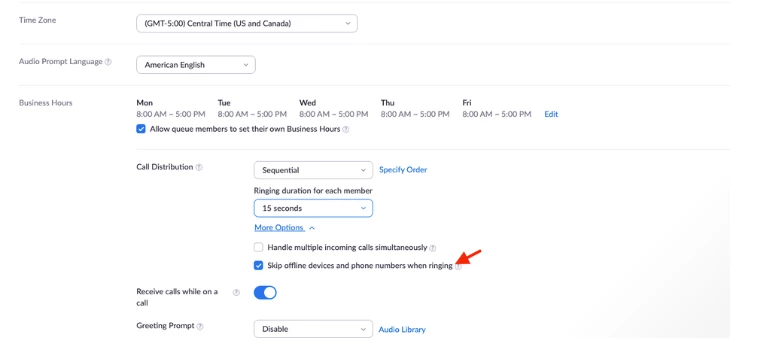
    uncheck the option - Skip offline devices in the call queue profile

     This fixed it!


    If issue persist the next step would be to officially delete the app as the root cause is likely due to a local cache issue on the device. This can be done by going to Settings > General > iPhone Storage > Zoom > Delete App. After this is complete download the Zoom application and login via the preferred or required sign-in type.


    Updated to help others in the Community.

    4 replies

    IP-Man
    Community Champion | Employee
    Community Champion | Employee
    March 29, 2022

    @paulzag-cato 

    You need to ensure that users call handling select the Zoom application to be toggled on to ensure mobile app gets the calls.


    You can do that by going to the user's profile>user setting>call handling.


    If this has answered or help find a solution to your question , please click the Accept as Solution button below so that others in the Community may benefit as well.

    Explorer
    April 4, 2022

    Yes Zoom Applications is already toggled on.

    FORE-Craig
    Specialist
    Specialist
    March 31, 2022

    Hi Paulzag,


    I would set the Call Distribution on the Call Queue to 'Simultaneous', this way all of the members of the team logged in at that time will have their iPhone and/or desktop apps ring. By doing that, they shouldn't need to log into the Zoom app on their laptops, if they don't want to. The 'Sequential' option does not ring all at the same time. 


    I hope that helps!


    Explorer
    April 4, 2022

    Thanks Craig, the hassle is they are all remote, so when a phone rings simultaneously and then stops, they spend 5 minutes trying to work out if someone else answered the phone call or if it went to voicemail.

    FORE-Craig
    Specialist
    Specialist
    April 4, 2022

    I understand! Do you think that by virtue of being logged in on their laptops, it sees their presence whereas with the iPhones, there is a lag because of the speed of the mobile phone system?

    paulzag-catoAuthorAnswer
    Explorer
    April 13, 2022

    The fix in our case was sorted via Support


    uncheck the option - Skip offline devices in the call queue profile

     This fixed it!


    If issue persist the next step would be to officially delete the app as the root cause is likely due to a local cache issue on the device. This can be done by going to Settings > General > iPhone Storage > Zoom > Delete App. After this is complete download the Zoom application and login via the preferred or required sign-in type.


    Updated to help others in the Community.

    FORE-Craig
    Specialist
    Specialist
    April 13, 2022

    Excellent!


    I hadn't seen that option since we use 'simultaneous'. Reading the tool-tip on the option reveals the "call to mobile phone with screen locked will be skipped".  I'm happy that the mystery is solved.!

    Newcomer
    February 7, 2025

    Oh man, missed calls are the worst! Especially when your phone should be ringing. There are a few things that could be going on here, so let's try to troubleshoot this.

    First, the super obvious one, but it's easy to forget: is your phone on silent? Check the little switch on the side of your iPhone. If it's flipped towards the screen, it's on silent. Flip it the other way, and you should be good to go. Also, double-check that Do Not Disturb isn't accidentally turned on. You can see that in Control Center (swipe down from the top right corner). Look for the little crescent moon icon. If it's there, tap it to turn Do Not Disturb off.

    Another thing to look at is your volume. It sounds silly, but sometimes it gets turned down super low without you realizing it. While you're on the home screen, press the volume buttons on the side of your phone to make sure they're turned up. You can also check the volume in Settings > Sounds & Haptics.

    Sometimes, your phone might be connected to a Bluetooth device (like your car or headphones) and trying to send the sound there instead of your phone's speaker. Go to Settings > Bluetooth and make sure you're not connected to anything you don't intend to be. If you are, disconnect from it.

    If all that checks out, it might be a network issue. Sometimes, if your phone has a weak cellular signal, it might not ring reliably. Try moving to an area with better reception and see if that helps.


    If none of these solutions work, you can follow for more better assistance below.

    https://thegeekpage.com/iphone-wont-ring-every-time-while-receiving-calls-fix/