


I'm looking for a way to have multiple users receive a call but some are external 10DLCs | Community
Skip to main content
Boyan
Explorer
Explorer
April 25, 2023
Solved

I'm looking for a way to have multiple users receive a call but some are external 10DLCs

  • April 25, 2023
  • 2 replies
  • 1 view

Hi everyone,


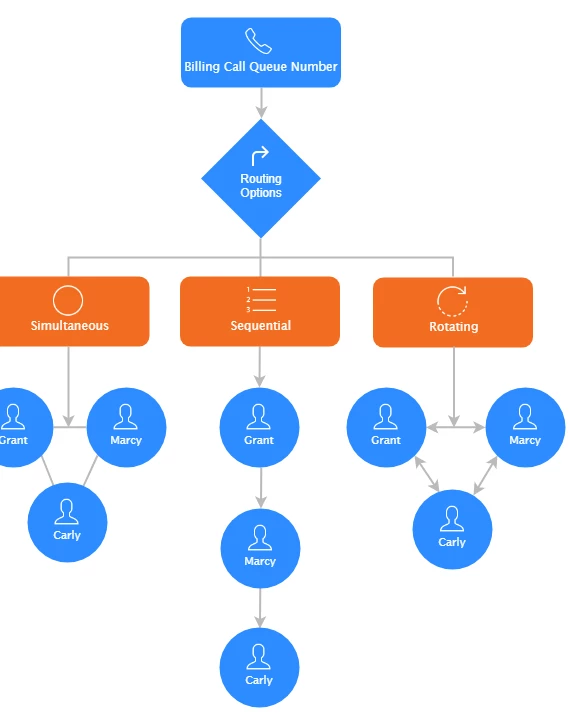
I'm looking for a way to have multiple users receive a call and whoever picks it up - they handle the call from thereon out. So far I've reviewed the following call routing methods but none fits my use case:


The sticking point is that some of the "members" must be an external numbers. Does such call routing method exist in Zoom phone? In the graph below, imagine if Carly and Grant are cell phone numbers?


Thanks

Boyan


    Best answer by sachinzoom

    Hi @Boyan 


    I have always done this using steps below :

    1. Create users for C&G

    2. You will need to assign a Calling plan and a phone number for Carly and Grant i.e. provision them for Zoom phone with a license.

    3. Once you do that, Change their call handling settings ( turn off Zoom phone, Zoom Appliances etc.) and forward to the external cell phone number. 


    Now in your call queue, you can include Carly and Grant.


    That should take care of your use case.


     If this response helps, please accept the answer as an accepted solution, so others can benefit as well.

    2 replies

    FORE-Craig
    Specialist
    Specialist
    April 26, 2023

    Hi @Boyan 


    If the users are not members of your organization's Zoom account, it won't be possible.


    If, however, they are members of your organization's Zoom account, they can be included and the Zoom app on their cell phones would ring being part of a Call Queue or Shared Line Group, just like on an internal desk phone, or the computer desktop Zoom app. 


    I hope that helps!


    Community Champion | Employee
    April 26, 2023

    Hi @Boyan 


    I have always done this using steps below :

    1. Create users for C&G

    2. You will need to assign a Calling plan and a phone number for Carly and Grant i.e. provision them for Zoom phone with a license.

    3. Once you do that, Change their call handling settings ( turn off Zoom phone, Zoom Appliances etc.) and forward to the external cell phone number. 


    Now in your call queue, you can include Carly and Grant.


    That should take care of your use case.


     If this response helps, please accept the answer as an accepted solution, so others can benefit as well.

    Community Champion | Employee
    April 26, 2023

    Note if forwarding just via call queue, You do need to assign them phone numbers. You will just need the license