
How can I block Zoom's Note-taking pop-up? | Community
Skip to main content
Explorer
April 7, 2026
Question

How can I block Zoom's Note-taking pop-up?

  • April 7, 2026
  • 6 replies
  • 956 views

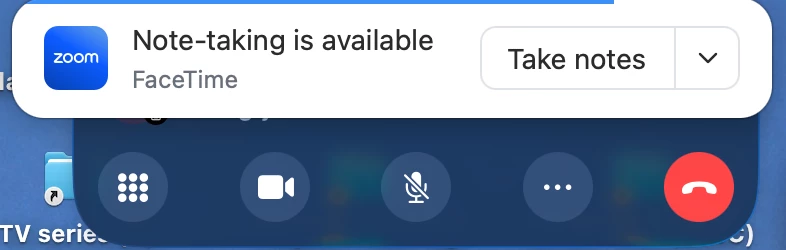
Recently, Zoom’s Note-taking has popped up on my Mac each time I use Siri to place a call on my iPhone – see the attached screenshot.

I’ve not found a setting to block this pop-up.

-- Ward
 

    6 replies

    Vinnie
    Community Champion | Customer
    Community Champion | Customer
    April 8, 2026

    Where have you looked ​@WardClark ?

    It seems more like an Apple Setting than a Zoom setting where you need to look. The screenshot seems to show like you are making the call from the Mac, or at least controlling the iPhone from the Mac so I would look there if you haven't yet.

    • Calling/Controlling a call from another Device (apple setting).
    • Making Zoom Notes the default Notes application (apple setting ?)
    Newcomer
    April 9, 2026

    It’s not.  I get it on my not-Apple desktop as well, and am also keenly interested in getting rid of it.

    Vinnie
    Community Champion | Customer
    Community Champion | Customer
    April 9, 2026

    I see.

    I don't have the means to replicate this with a Mac; you can always do a quick test by disabled Zoom Tasks in Zoom's Portal to verify if you still get the same behavior, trying to figuring what is the connection. Also you could try checking the individual settings of AI Companion related to tasks

    https://zoom.us > Personal > Settings > AI Companion > AI Companion:   Try disabling everything that is “Automatic”
    https://zoom.us > Personal > Settings > AI Companion > Tasks:  Here you can disable Zoom Tasks completely

    Let me know how it goes.

    Newcomer
    April 19, 2026

    I am also tired of this pop-up on my Windows PC.  It is very hard to manage the Zoom interface when changes like this conspire to slow us down.

    Explorer
    April 20, 2026

    @WardClark ​@Jason Farrell ​@G Eric Moorhouse I see the same pop-up on my Windows 11 computer.

    I’ve gone into my Zoom's Portal and turned off the following individual settings related to notes.

    https://zoom.us > Personal > Settings > Notes > General > Enable my Notes:   Disabling this disables all Note related icons and pop-ups in my Zoom meetings.

    Posted on April 20th, 2026. On Windows 11 and my business account. Zoom Version 7.0.2 (34412).

    Newcomer
    April 20, 2026

    Thanks.  I have no idea how I didn’t find that before, but I’ve turned that off now and I didn’t get the pop-up.

    WardClarkAuthor
    Explorer
    April 24, 2026

    With an assist from earlier comments & Claude, I was able to disable the Zoom Notes pop-up in my Basic account on macOS Safari:

    https://www.zoom.com/ > Sign In >  left navigation menu > My Account > Settings > Notes (top tab bar) > General > Enable My notes

    Newcomer
    May 1, 2026

    I think this will work.  I haven’t tested it yet, but it makes sense.  Disable all of these:


    Newcomer
    May 8, 2026

    To block the pop up: 

    Go to Zoom Home > Settings (make sure it's the icon on the far left in the gray margin at the bottom) > Notifications & sounds > scroll down a screen or two to find  “Reminders to open My notes in these apps (_) > Manage. Turn off for Face Time and What’s App and anything else you don’t want the pop-up to appear on.

    When you get to Notifications & sounds, there are several categories, starting with Volume, then Ringtones, etc. Scroll down to get to “Send desktop notifications for:”.  The options there include “Upcoming meetings,” “Automatically detect voice activity to create My Notes,” and then “Reminders to open My notes in these apps.”   Beside the “Reminders to open My notes in the apps (_)” is a button for “Manage”. Click on Manage, and you get a list including Zoom, Microsoft Teams, Chrome, WebEx Discord, Slack, WhatsApp, FaceTime, Safari, Microsoft Edge, and Firefox. I toggled Off for FaceTime. Then made a call on my Mac, and voila! No notes pop-up. Yay!!
