Hotline Phone | Community
Skip to main content
Newcomer
February 11, 2022
Solved

Hotline Phone

  • February 11, 2022
  • 7 replies
  • 12 views

Does Zoom offer a hotline feature for desk phones?  If someone picks up the handset it should automatically dial a preprogrammed number.

    Best answer by BrandonS

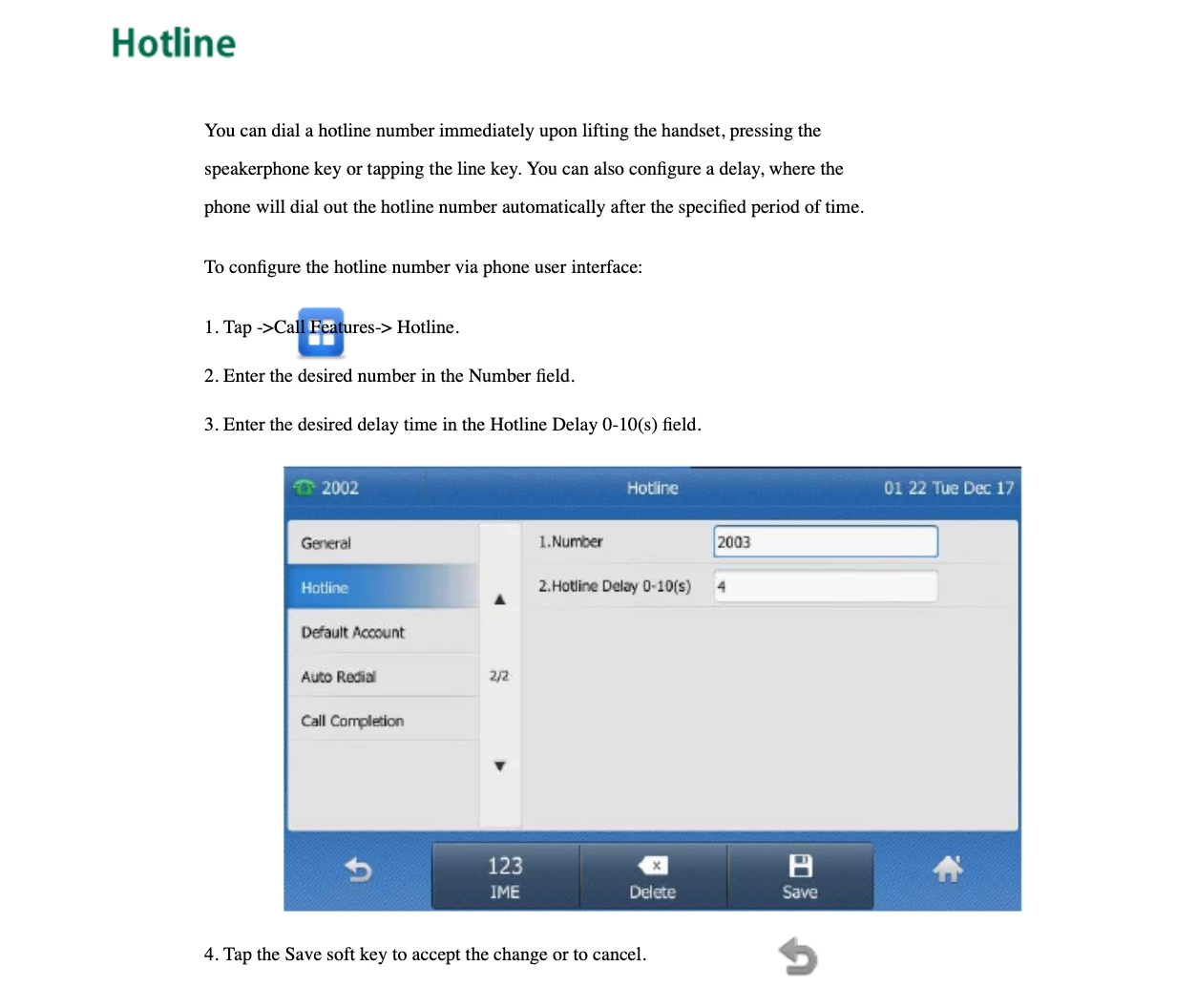
    That should be no problem with any Yealink phone.  I assume this is indoors like an office hallway?  Because I wouldn't install a regular Yealink outdoors..  I found this example to configure.  It looks quite simple:


    7 replies

    BrandonS
    Community Champion | Partner
    Community Champion | Partner
    February 11, 2022

    As a native feature configured through the web portal I am pretty sure no.

    But, most IP phones can do this as a feature of the phone.  Yealink I am sure can and is fully supported by Zoom Phone.  Other phone types may or may not and the feature may sometimes be called "ring down" if you are researching it.


    Good luck.

    BrandonS
    Community Champion | Partner
    Community Champion | Partner
    February 11, 2022

    And I also know this is a feature of some analog adapters that work with Zoom Phone so if your application is for something like a door phone you could make that work with a variety of purpose built analog door phones like ones with no dialpad.  One other thought is to program a speed dial button on a phone and have a sign that instructs visitors to press the button to reach someone.


    Do you want to share more specifics about your application and how you would like it to work?

    MarlynAuthor
    Newcomer
    February 11, 2022

    We are looking for a door phone solution.  If we can prevent visitors from having to pick up and speak through the handset would be ideal.  Maybe press a button and speak via the speaker.  We do have Yealink phones.  The solution needs to be minimal to no cost.  No additional hardware, other than the Yealink.

    BrandonS
    Community Champion | Partner
    BrandonSAnswer
    Community Champion | Partner
    February 11, 2022

    That should be no problem with any Yealink phone.  I assume this is indoors like an office hallway?  Because I wouldn't install a regular Yealink outdoors..  I found this example to configure.  It looks quite simple:


    Contributor I
    February 18, 2022

    You can do this with an AudioCodes ATA (look in the manual for autodial)

    Newcomer
    March 23, 2022

    Does anyone know if this is possible with a Poly VVX450 or VVX250 on Zoom?

    BrandonS
    Community Champion | Partner
    Community Champion | Partner
    March 23, 2022

    Do you have the admin password for the phones?  Here is a tutorial that should apply: https://youtu.be/tAdoDZoT2Rw


    I think you could also use the info from the tutorial to put into a provisioning template as described here: https://support.zoom.us/hc/en-us/articles/360035817952-Configuring-desk-phone-provision-templates#h_d83fdf12-88bd-468a-bf62-9cde18c9f1e1


    Newcomer
    March 23, 2022

    I do have the admin password. This is perfect. Thank you!


    Explorer
    July 31, 2023

    Any way to do this on a poly b30? I don't see options to upload a config file. 

    Explorer
    May 8, 2024

    for a Poly B30 example you would create a provision template with the following.  DN 1000 is the number that would be dialed, SX is the number of seconds until it would be dialed. 


    <ParameterList>
    <Object>
    <Name>VoiceService.1.VoiceProfile.1.</Name>
    <ParameterValueStruct>
    <Name>DigitMap</Name>
    <Value>(&lt;S0:1000&gt; | xxxxS3 )</Value>
    </ParameterValueStruct>
    </Object>
    </ParameterList>


    Newcomer
    May 8, 2024

    Just to add another dimension to this thread. I have a number of analogue phones connected to Poly ATA 400s. Is there a way of configuring a hotline for these. I want the analogue phones to call a specific number if the handset is picked up. As well as searching this site I have looked at doing this on both the Zoom side and on the Poly ATA itself but with no success. I would really appreciate it if anyone on here can help.


    Thank you

    Explorer
    May 8, 2024

    For the Poly ATA you would bind a Provision Template with the following, DN 1000 is the number that would be dialed.  SX is the number of seconds until it would be dialed. 


    <ParameterList>
    <Object>
    <Name>VoiceService.1.X_FXS.1.</Name>
    <ParameterValueStruct>
    <Name>DigitMap</Name>
    <Value>(&lt;S0:1000&gt;)</Value>
    </ParameterValueStruct>
    </Object>
    </ParameterList>

    Newcomer
    May 9, 2024

    Thank you for the answer.

    Sorry I'm new to this.  I cannot see where SX is. If I wanted the time to be 3 seconds where exactly would I enter that.